Remote MCP for your app's users
Let the people who use your app connect it to their own AI assistant. Your app serves an MCP server; each user adds it to Claude (custom connectors) or ChatGPT (connectors), signs in on your app's branded page, approves the connection, and from then on asks their assistant about their own data in your app. Every user sees only their own data, and can disconnect at any time.
Strongly runs everything around your MCP server: the OAuth 2.1 authorization server for your app's users (the MCP authorization specification, 2025-11-25), the consent page, the tokens, the checks on every request, revocation and the audit log. Your app implements the MCP tools.
How it works
 Claude / ChatGPT                      Strongly                                   Your app
 ----------------                      --------                                   --------
 POST <server URL>  ─────────────────▶ 401 + where to authorize
 discovery, registration ───────────▶ /.well-known/..., /oauth/apps/<id>/register
 browser: authorize ────────────────▶ your branded sign-in page (sites/<slug>/)
                                       consent page (sites/<slug>/connect): client,
                                       where it returns, the scopes
 code + PKCE ───────────────────────▶ /oauth/apps/<id>/token
                ◀────────────────────  access token (15 min) + refresh token
 POST <server URL>, Bearer token ───▶ checks the token on every request ─────────▶ POST <your MCP path>
                                       (signature, issuer, audience, expiry,         X-Strongly-User-Token: the user
                                       connection not revoked, user still yours)     X-Strongly-Mcp-Token: the token
                ◀────────────────────  JSON or event stream only  ◀──────────────── your tool's answer
Turn it on
- Choose Sign-in required in the Access section of your app's Permissions tab (Branded Sign-in & Sign-up) and set up its Sign-in section. Users sign in there to connect a client, so only your app's users (their Home App is your app) can connect one.
- In the Connected apps (MCP) section, in the Remote MCP for your users card:
- MCP endpoint path in your app: where your app serves MCP (Streamable HTTP), default
/mcp. - Scopes: what a client may do, each with a description users read on the consent page, such as
notes:read: "Read your notes". At least one. - Clients may return users to:
claude.ai(Claude on the web, desktop and mobile) andchatgpt.com(ChatGPT) by default. - Allow clients on the user's own computer: lets Claude Code and the MCP Inspector connect (they return to
http://localhostor127.0.0.1on any port). The consent page warns the user when a client returns to their own computer.
- MCP endpoint path in your app: where your app serves MCP (Streamable HTTP), default
- Save. Only the app's owner or a platform administrator can change these settings.
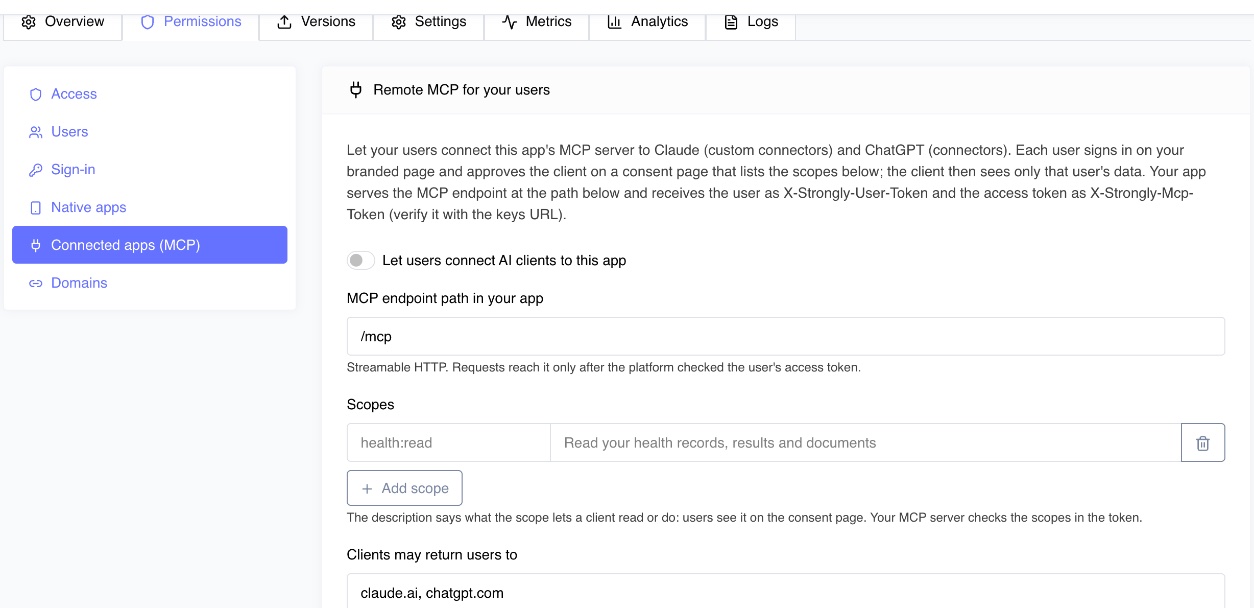
The card shows the MCP server URL your users add: https://<platform>/mcp/apps/<app id>.
With the API
curl -X PATCH "$STRONGLY_URL/api/v1/apps/$APP_ID/remote-mcp" \
  -H "X-API-Key: $STRONGLY_API_KEY" -H "Content-Type: application/json" \
  -d '{"enabled": true, "path": "/mcp",
       "scopes": [{"name": "notes:read", "description": "Read your notes"}],
       "redirectHosts": ["claude.ai", "chatgpt.com"], "loopbackRedirects": false}'
from strongly import Strongly

client = Strongly()
settings = client.apps.update_remote_mcp(
    app_id,
    enabled=True,
    path="/mcp",
    scopes=[{"name": "notes:read", "description": "Read your notes"}],
)
print(settings["serverUrl"])
What your users do
Claude (web, desktop or mobile): Settings, Connectors, Add custom connector, paste the MCP server URL, Connect. ChatGPT: Settings, Apps and Connectors, add the URL as a connector (developer mode on a workspace that allows it). Either one opens your branded sign-in page, then the consent page:
- which client asks (its name, and the host its metadata comes from),
- where it will send them back (
claude.ai,chatgpt.com, or their own computer, with a warning), - each scope with its description,
- the account they are signed in with.
Allow returns them to their assistant, connected. Cancel tells the assistant they declined.
Build the MCP server in your app
Your app serves MCP at the path you set, with any MCP server library (the official TypeScript and Python SDKs work in stateless Streamable HTTP mode). A request reaches your app only after Strongly checked its access token, and carries:
| Header | What it is |
|---|---|
X-Strongly-User-Token | The signed-in user, exactly as your app gets it for a browser through the app proxy (user.id, email, name, appRole). Your existing identity code serves both. |
X-Strongly-Mcp-Token | The OAuth access token: an ES256 JWT (typ: at+jwt) with iss (the app's issuer), aud (the MCP server URL), sub (the user's id), client_id, scope (space separated), grant_id (the connection) and exp. |
Nothing else the client sent reaches your app (no cookies, no other headers), and only a JSON or event-stream answer goes back to the client.
Check the scopes in every tool. The platform checks who the user is; which tool a scope allows is your app's decision. Verify the access token with the platform's published keys and read its scopes. The platform gives your app its MCP server URL and token issuer at every deploy and restart, as STRONGLY_MCP_SERVER_URL and STRONGLY_MCP_ISSUER:
import { createRemoteJWKSet, jwtVerify } from 'jose';

const host = process.env.STRONGLY_HOST;          // the platform's URL
const jwks = createRemoteJWKSet(new URL(`${host}/oauth/jwks`));

export async function mcpCaller(req) {
  const { payload } = await jwtVerify(req.headers['x-strongly-mcp-token'], jwks, {
    issuer: process.env.STRONGLY_MCP_ISSUER,        // <platform>/oauth/apps/<app id>
    audience: process.env.STRONGLY_MCP_SERVER_URL,  // <platform>/mcp/apps/<app id>
    typ: 'at+jwt',
    algorithms: ['ES256'],
  });
  return { userId: payload.sub, scopes: payload.scope.split(' '), clientId: payload.client_id };
}
import os
import jwt  # PyJWT[crypto]

jwks = jwt.PyJWKClient(f"{os.environ['STRONGLY_HOST']}/oauth/jwks")

def mcp_caller(token: str) -> dict:
    key = jwks.get_signing_key_from_jwt(token).key
    claims = jwt.decode(token, key, algorithms=["ES256"],
                        issuer=os.environ["STRONGLY_MCP_ISSUER"], audience=os.environ["STRONGLY_MCP_SERVER_URL"])
    return {"user_id": claims["sub"], "scopes": claims["scope"].split(), "client_id": claims["client_id"]}
Read only that user's data in every tool, by the user id, and answer a tool whose scope was not granted with an MCP tool error. Never take a user id as a tool argument. Never pass the access token on to another service.
Connections: users and administrators
A connection is one user's consent to one client. Users see and end their own; administrators see and end everyone's.
- In your app, for the signed-in user: your app's server calls
GET /api/v1/me/mcp-connectionsandDELETE /api/v1/me/mcp-connections/:idwith the user'sX-Strongly-User-Token(it travels with your app's own platform token): through your app, a user reaches only their connections to it. A native app calls them with the user'sX-Strongly-Login-Token. - In the dashboard: the Remote MCP card lists every connection (user, client, scopes, connected, last used) with a Disconnect action.
GET /api/v1/apps/:id/mcp-connectionsandDELETE /api/v1/apps/:appId/mcp-connections/:iddo the same for the app's owner, app admins and platform administrators.
Disconnecting takes effect at once: the client's next request is refused and its refresh token no longer works. Turning remote MCP off disconnects every client.
Security model
- Tokens reach your app's MCP server and nothing else. Every access token names one audience, your app's MCP server URL, and one issuer, your app's authorization server. A token for another app is refused (
401 invalid_token). It is signed with the platform's ES256 key, which signs nothing else: the Strongly API, DDP and the dashboard do not accept it, so a token carries no power on the platform. The keys are published at<platform>/oauth/jwks; the private key is stored encrypted. - Short-lived access, rotating refresh. Access tokens last 15 minutes. A refresh token works once; each refresh returns a new one. A refresh token or authorization code used twice revokes the whole connection (it means a copy is in someone else's hands).
- Checked on every request. Signature, issuer, audience, expiry, the connection still live, and the user still a user of your app whom it serves (an archived or deactivated account, a user removed from the app, or a paid app's user without a plan is refused).
- Authorization code with PKCE (S256) only. No implicit flow, no client credentials, no plain PKCE. Codes are single use and last 5 minutes; codes, refresh tokens and client secrets are stored only as hashes.
- Redirects only where you allow. A client registers its redirect URIs, which must be https on a host you listed (default
claude.ai,chatgpt.com) on the default port, or loopback addresses if you allow them. An authorization request must use a registered redirect URI exactly (a loopback one on any port). A request whose client or redirect URI is not trusted ends on an error page and is never redirected. - Clients. Dynamic Client Registration (RFC 7591): at most 5 redirect URIs, authorization code and refresh token grants only, 20 registrations a minute per address and 120 per app; a client that never connects anyone is removed after a day. Client ID Metadata Documents (how Claude Code and ChatGPT identify themselves) are read only from a host you allow, over https, never from a private address, without redirects, at most 16 KB.
- Scopes. A client gets at most the scopes the user approved; a refresh can narrow them, never widen them.
- Consent is the user's own. The consent page is shown only to a signed-in user of your app (a platform account or another app's user is asked to sign in with an account of yours), cannot be framed, and the decision is made over the user's own authenticated connection: there is no URL another site could post an approval to. A request is decided once and expires after 15 minutes.
- No Strongly session on the MCP endpoint. The MCP and OAuth endpoints never read a cookie. Your app's answer reaches the client only as JSON or an event stream, with no cookies and a content policy that blocks running anything, so nothing your app returns can act on the platform's origin.
- Limits. Per address and per connection rate limits answer
429withRetry-After; MCP request bodies are limited to 4 MB. - Audit. Every client registration, authorization (approved or denied), token, refresh, revocation and every tool call (the tool, the user, the client, the status and the time taken) is written to the platform audit log with the address it came from. Reuse of a code or refresh token is logged as critical.
Reference
| URL | What |
|---|---|
<platform>/mcp/apps/<app id> | The MCP server URL (the resource) |
<platform>/.well-known/oauth-protected-resource/mcp/apps/<app id> | Protected resource metadata (RFC 9728) |
<platform>/oauth/apps/<app id> | The issuer |
<platform>/.well-known/oauth-authorization-server/oauth/apps/<app id> | Authorization server metadata (RFC 8414) |
<issuer>/authorize, /token, /register, /revoke | OAuth endpoints (RFC 6749, 7636, 7591, 7009, 8707, 9207) |
<platform>/oauth/jwks | The signing keys |
REST: GET / PATCH /apps/:id/remote-mcp, GET /apps/:id/mcp-connections, DELETE /apps/:appId/mcp-connections/:id, GET and DELETE /me/mcp-connections.