Model Registry
The Model Registry keeps your traditional ML models: their versions, how each is deployed and scaled, every prediction it makes, and how it performs in production. Each registered model has a page that is its model card.
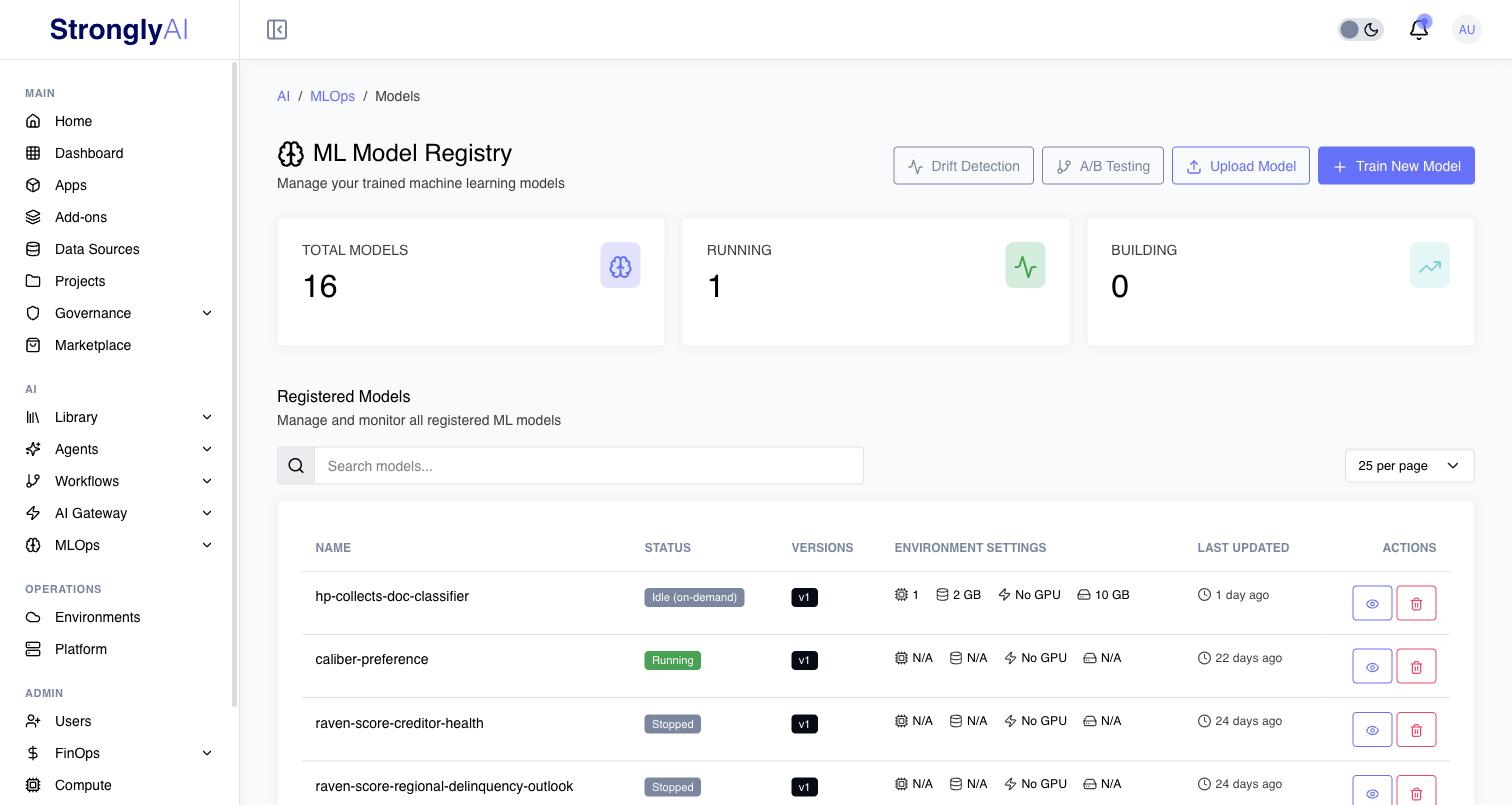
The Model Registry page
Open MLOps > Model Registry. The header offers:
- Drift Detection: every model's drift status (see Drift Detection);
- A/B Testing: tests that split traffic between models (see A/B Testing);
- Upload Model: register a model you trained elsewhere (see Register a model);
- Train New Model: start an AutoML job.
The cards count Total Models, those Running and those Building. Registered Models lists the models you can see. Search by name, description or tag; a model shared with you carries a Shared badge. Each row shows the model's name, Status, Active Version, Environment Settings (CPU, memory, disk and GPU), when it was last updated, and View Details and Delete.
Model status
| Status | Meaning |
|---|---|
| Ready to Deploy | Registered, never deployed |
| Building | Its serving image is being built |
| Deploying / Starting | Its pods are starting |
| Running | Serving predictions |
| Idle (on-demand) | An on-demand model scaled to zero; its next prediction wakes it |
| Stopped | Not serving; Start brings it back |
| Training / Evaluating | Still being produced |
| Failed | Could not build or start; the Logs tab says why |
| Archived | Kept, no longer served |
In this section
- Register a model: from AutoML, from an experiment run, or by uploading a model file or a model bundle.
- The model page: every tab of a model's page, including analytics and the Test tab.
- Deploy and scale: resources, always-on, on-demand and scheduled serving, autoscaling, and versions.
- Monitoring: the model's task, what is recorded with each prediction, baselines, actuals and drift from the model's page.
Access
A model is private to its owner until shared on its Permissions tab, with named users or with all users. A user it is shared with to use ("Can use") can open it, call it and read its monitoring, but sees no Deploy, Start, Stop, Delete or environment changes; its owner, the people it is shared with to edit, and administrators have those. Publishing and deploying a model can require governance approval when a governance solution covers ML models (see Governance).
REST API
GET    /api/v1/mlops/models                         List registered models
POST   /api/v1/mlops/models                         Register a model
GET    /api/v1/mlops/models/{id}                    Get a model (with its monitoring settings and drift state)
PATCH  /api/v1/mlops/models/{id}                    Change a model's card fields, e.g. its task (problemType)
PATCH  /api/v1/mlops/models/{id}/monitoring         Change Record inputs and the actuals window
POST   /api/v1/mlops/models/{id}/deploy             Deploy
POST   /api/v1/mlops/models/{id}/predict            Predict
POST   /api/v1/mlops/models/{id}/baselines          Build a version's baseline
POST   /api/v1/mlops/models/{id}/actuals/imports    Import a file of actuals
See the Model Registry API for every endpoint.
Python SDK
from strongly import Strongly

client = Strongly()

for model in client.model_registry.list():
    print(model.name, model.active_version, model.latest_drift)

client.model_registry.deploy(model_id)
result = client.model_registry.predict(model_id, {"age": 42, "plan": "pro"})

# The active version's baseline from a local CSV, with daily drift analysis
client.model_registry.build_baseline_from_file(model_id, "reference.csv", analyze_daily=True)