Compare and Register
View experiments
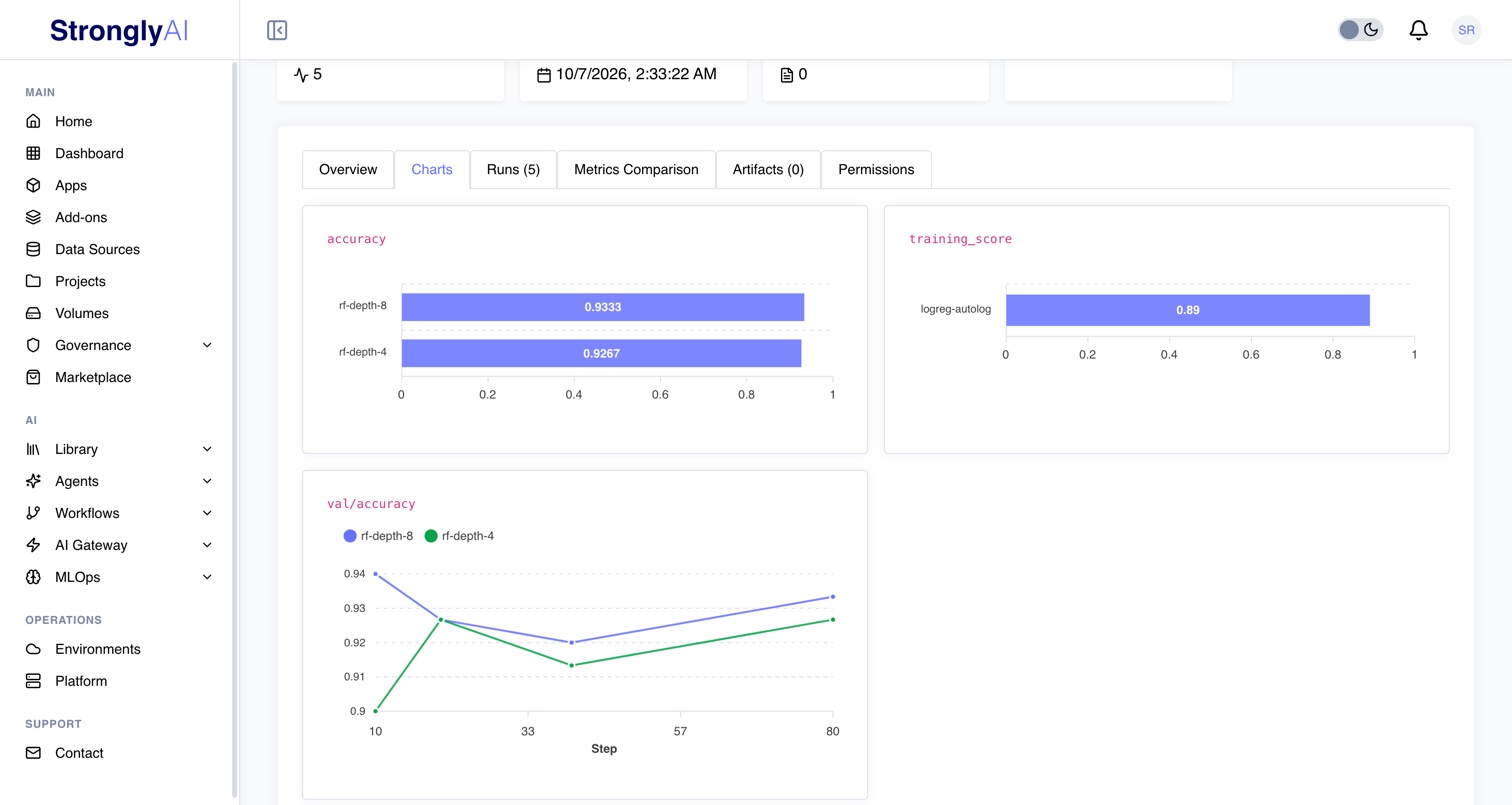
Open MLOps > Experiments. The cards count your experiments and their runs by status. The list shows your experiments: search by name, filter by status or tag, pin the ones you come back to (pinned experiments stay at the top), and select two or more to compare their params and metrics. Click an experiment's name to open it. An experiment that groups runs shows Running while any of its runs runs, otherwise its newest run's status (Pending before its first run).
An AutoML job's View Training Experiment opens that job's experiment page. Selecting two or more experiments opens Metrics Comparison: their parameters and final metrics side by side, with the parameters that differ between them highlighted.
Open an experiment (or a run) to see:
- Overview: its params, the latest value of each metric and the step it was logged at, the machine it ran on and its git commit.
- Charts: pick a metric from the Metric dropdown to see its chart, with a line for each run that logged it (a metric each run logged once is a bar per run). It opens on the validation score when one was logged.
- Runs: its runs with their status, start, duration and metrics; a failed run shows the error that failed it. Open one to see its own detail, where a failed run shows the error with its traceback.
- Metrics Comparison: its runs side by side, and a parallel coordinates chart of the metrics you choose.
- Artifacts: its files; preview a text file or download any.
- Permissions: who it is shared with (an experiment's; a run is shared as its experiment is).
Share an experiment
An experiment's Permissions tab shares it with named users, or allows all users to open it. Its runs are shared as it is: whoever can open the experiment can open every run in it, with its metrics and artifacts. A user it is shared with can also start runs in it, and you see those runs too. From Python: client.experiments.add_member(experiment.id, user_id=user_id, role="user") (role="editor" may also change it), remove_member(experiment.id, user_id) and set_visibility(experiment.id, "public").
Register a run's model
A run that logged a model has a Register model button. Register it as a new model (give it a name) or as a new version of a model you have. From Python:
registered = run.register_model("churn-model")                        # a new model, version 1
client.experiments.register_model(other_run.id, model_id=registered.model_id)   # its version 2
The model file is copied into the registry, so deleting the run leaves the model. The run becomes the version's training record:
- its params as the hyperparameters;
- its metrics named
accuracy,precision,recall,f1,auc,logloss,rmse,mae,mse,r2ormapeon the model card; - its machine, start and end;
- the task
log_modelrecorded, as the model's task.
A model registered without a task (logged before log_model recorded one, or one whose task it could not tell) cannot be monitored for drift until it has one: set its Task in Monitoring settings on the model's Monitoring tab, or with client.model_registry.update(model_id, problem_type="classification").
The run's page links to every version registered from it. Deploy, test, A/B test and monitor the version for drift from the Model Registry.
A scikit-learn, XGBoost or LightGBM model needs its feature names (predictions and drift are reported by feature): fit it on a DataFrame, or log it with log_model(model, feature_names=[...]).
From the client
strongly.Strongly().experiments has the same operations by id, for scripts that read or manage runs rather than train:
from strongly import Strongly

client = Strongly()
experiment = client.experiments.register(name="churn-model")
for run in client.experiments.list_runs(experiment.id, status="completed"):
    print(run.name, run.params, {k: m.value for k, m in run.latest_metrics.items()})
history = client.experiments.get_metric_history(run.id, "val/auc")
comparison = client.experiments.compare([r.id for r in client.experiments.list_runs(experiment.id)])
See the Experiments SDK reference and the Experiments REST API.