Monitoring Models
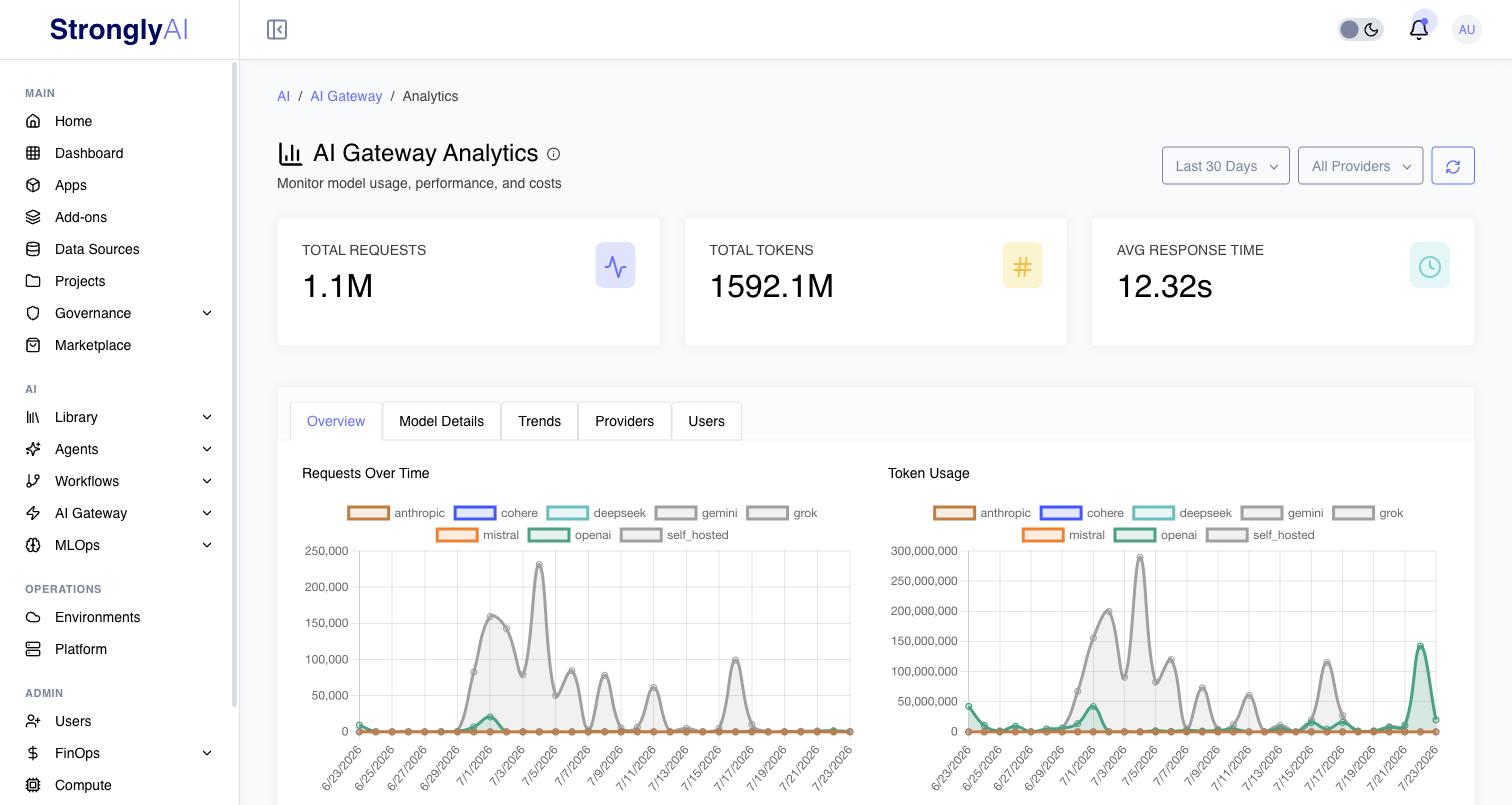
Monitor model usage and performance with the AI Gateway analytics: requests, tokens, latency and errors, per model, provider and user. Usage is counted in requests and tokens; no price is put on tokens. Infrastructure cost, including that of self-hosted models, is in FinOps.
Who is counted
Each figure counts the requests you may count: a platform administrator every request, an organization owner or admin on a multi-tenant platform their organization's members, and anyone else their own requests. The same rule applies to the request figures on the AI Gateway overview and on a model's page, including for a model shared with you, such as the platform's embedding model.
What is counted
Every call the gateway serves is counted: chats and completions, and embeddings, moderation, reranking, speech, transcription, translation, image, video and music calls. For a call other than a chat or a completion, only its figures are kept (model, user, time, response time, tokens, success), never its inputs or outputs. Tokens a call does not report (speech, images, video, music) count as none.
Metrics
| Metric | Description |
|---|---|
| Requests | Calls to the gateway |
| Tokens | Input (prompt) and output (completion) tokens, and their total |
| Avg Response Time | Mean latency, in milliseconds |
| P95 / P99 Response Time | The latency 95% / 99% of requests completed within |
| Error Rate | Percent of requests that failed |
| Success Rate | Percent of requests that succeeded |
| Users / Models | Distinct users and models with requests |
A figure with no requests behind it (the latency of a range with no requests) is empty, not zero.
Monitor P95 and P99 latency to ensure consistent user experience. High P95/P99 values indicate performance issues affecting some users even if average latency is acceptable.
Analytics API
The same figures are in the REST API. Every endpoint takes a required
dateRange: 24h, 7d, 30d or 90d, the range ending now.
| Endpoint | Returns | Other parameters |
|---|---|---|
GET /api/v1/ai-gateway/analytics/usage | The range's totals: requests, tokens, latency, error and success rates, users, models | modelId |
GET /api/v1/ai-gateway/analytics/performance | Per model: requests and latency (average, minimum, maximum, P95, P99) | modelId |
GET /api/v1/ai-gateway/analytics/time-series | Per provider and period: requests, tokens, mean latency, errors | granularity (required): hourly (with 24h only) or daily; provider |
GET /api/v1/ai-gateway/analytics/providers | Per provider: models, requests, tokens, mean latency, users |
A daily series has every day of the range, with zero requests on a day without
any. See the AI Analytics API and the Python SDK's
client.ai.analytics.
Guardrails Monitoring
Platform-Wide Guardrail Metrics
- Total Models: Number of deployed models (self-hosted + third-party)
- Protected Models: Count of models with guardrails enabled
- Total Rules: Aggregate count of all active guardrail rules
- Blocked Today: Requests blocked by guardrails in last 24 hours
- Modified Today: Requests modified by guardrails in last 24 hours
Per-Model Guardrail Metrics
Each model tracks:
- Enabled Status: Whether guardrails are active for this model
- Rules Count: Total number of configured rules
- Input Rules: Rules applied to user prompts before model inference
- Output Rules: Rules applied to model responses before returning to user
- Total Requests: Number of API calls processed
- Blocked Requests: Requests denied due to policy violations
- Modified Requests: Requests altered by guardrails (e.g., PII redaction)
- Block Rate: Percentage of requests blocked
Guardrail Rule Types
Monitor specific rule categories:
Content Filtering
-
Toxicity Detection: Blocks toxic, offensive, or harmful content
- Categories: Hate speech, harassment, violence, profanity, sexual content
- Threshold levels: Low (permissive), Medium (balanced), High (strict)
-
PII Detection: Identifies and redacts personally identifiable information
- Detects: Email addresses, phone numbers, SSN, credit cards, IP addresses, names, addresses, dates of birth
- Actions: Redact, mask, or block entire request
-
Prompt Injection Detection: Detects attempts to manipulate model behavior
- Patterns: "Ignore previous instructions", system prompt extraction, role confusion
Topic Restrictions
- Allowed Topics: Restricts model to specific subject areas
- Banned Topics: Blocks specific prohibited subjects
Output Validation
- Format Enforcement: Ensures output matches required structure
- Formats: JSON schema, XML, markdown, specific patterns
- Action: Retry generation or return error
Filters & Options
Customize your analytics view:
Date Range
- Last 24 hours
- Last 7 days
- Last 30 days
- Last 90 days
Provider Filter
View all providers or filter by:
- OpenAI
- Anthropic
- Google (Gemini)
- Mistral
- Cohere
- DeepSeek
- Grok (xAI)
- ElevenLabs
- Stability AI
- Black Forest Labs
- Runway
- Luma AI
- Self-Hosted (vLLM)
API Access
All analytics data is available programmatically via the REST API endpoints listed above.
Best Practices
Regular Monitoring
- Daily: Check summary metrics and traffic trends
- Weekly: Review model performance and optimize configurations
- Monthly: Analyze usage patterns and forecast future needs
Performance Optimization
- Identify Slow Models: Sort by P95/P99 latency
- Analyze Error Rates: Investigate models with high error rates
- Optimize Token Usage: Review input/output token ratios
- Scale Appropriately: Adjust autoscaling based on usage patterns
Infrastructure Cost
Self-hosted models cost what their compute costs; see FinOps for that cost and for budgets.
Security Monitoring
- Review Guardrail Activity: Check blocked and modified requests
- Investigate Anomalies: Look for unusual traffic patterns
- Monitor User Activity: Track per-user usage for abuse detection
- Update Rules: Adjust guardrails based on observed patterns
Troubleshooting
High Error Rates
Possible causes:
- Model overloaded (needs more resources)
- API key issues with third-party provider
- Network connectivity problems
- Invalid request formats
Solutions:
- Enable autoscaling or add more instances
- Verify API key validity
- Check network connectivity
- Review request logs for formatting issues
High Latency
Possible causes:
- Insufficient compute resources
- Cold starts (on-demand deployment)
- Large input/output token counts
- Network latency
Solutions:
- Scale up resources or enable autoscaling
- Use "Always On" deployment
- Optimize prompts to reduce token usage
- Deploy in regions closer to users
Unexpected Infrastructure Cost
Possible causes:
- Self-hosted models autoscaling to max replicas
- Forgotten "Always On" self-hosted models
Solutions:
- Review autoscaling configuration
- Audit deployed models and stop unused ones
- Check the models' cost in FinOps
Guardrails Over-Blocking
Possible causes:
- Thresholds too strict
- False positives in content detection
- Overly broad topic restrictions
Solutions:
- Adjust sensitivity thresholds
- Review blocked requests to identify patterns
- Refine allowed/banned topic lists
- Add exemptions for legitimate use cases
Next Steps
- Optimize costs based on usage insights
- Configure autoscaling based on traffic patterns
- Learn about deployment options to improve performance