AI Gateway
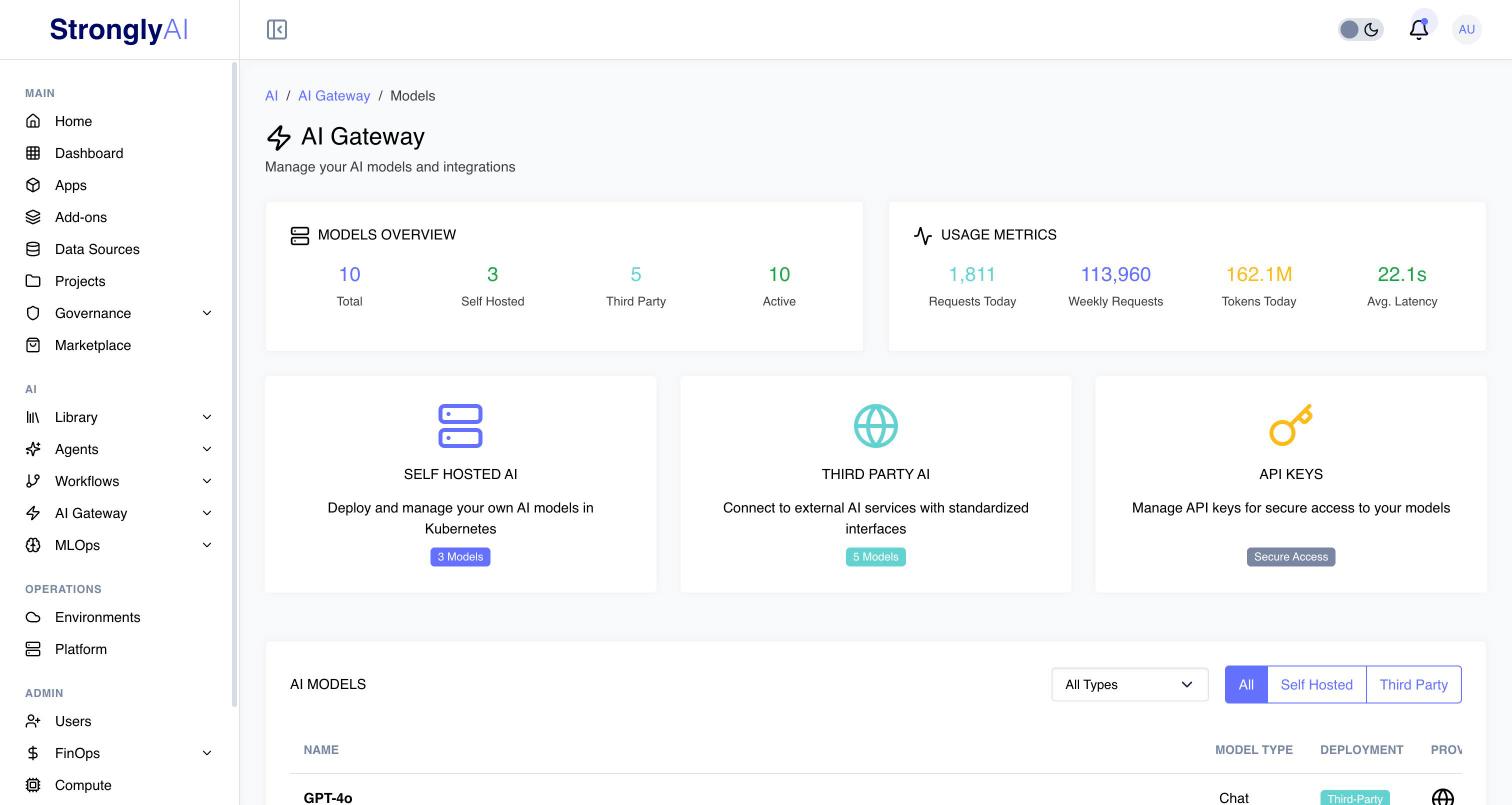
The AI Gateway provides a unified, vendor-agnostic API for accessing AI models across 12 providers. With 316 certified models (as of July 2026), you can access chat completions, multimodal (vision), embeddings, text-to-speech, speech-to-text, image generation, video generation, and music generation through a single consistent interface.
Key Features
- Unified API: Single interface for all providers (OpenAI, Anthropic, Google, Mistral, Cohere, Grok, DeepSeek, ElevenLabs, Stability AI, Black Forest Labs, Runway, Luma, plus custom/vLLM/Kubernetes for self-hosted)
- SDK Compatible: Drop-in replacement for OpenAI SDK - requests via the
/v1/prefix automatically enable OpenAI compatibility mode (stripsproviderandprovider_responsefields from responses) - Multi-Modal Support: Text, vision (image input), audio (TTS/STT), video, and music generation. Vision Language Models (GPT-6, GPT-5, GPT-4o, Claude, Gemini 2.5 and later, Mistral Large 4, etc.) are classified as
multimodaltype withvisioncapability - Certified Models: Models are loaded from static JSON certification data on gateway startup
- Guardrails: Input and output guardrails with content filtering, PII detection, and prompt injection protection (applied on completions endpoint)
- Consistent Error Handling: Standardized error responses across all providers
- Usage Tracking: Token counting, latency monitoring, and cost tracking
- Organization Scoping: Multi-tenant isolation via
X-Organization-IDheader on model management endpoints
Authentication
API requests require the X-User-Id header for user identification. Context headers (X-App-Id, X-Workflow-Id, or X-Workspace-Id) are required for TTS, STT, and generation endpoints but are optional for chat and completion endpoints (used for analytics tracking when provided).
Required Headers
| Header | Required | Description |
|---|---|---|
X-User-Id | Yes | Authenticated user's ID |
X-Organization-ID | Recommended | Organization ID for multi-tenant resource isolation (required for model CRUD and fine-tuning) |
X-App-Id | Conditional | App ID (required for TTS/STT/Generations, optional for chat/completions) |
X-Workflow-Id | Conditional | Workflow ID (alternative to X-App-Id) |
X-Workspace-Id | Conditional | Workspace ID (alternative to X-App-Id) |
X-OpenAI-Compat | Optional | Set to true for strict OpenAI SDK compatibility (removes provider and provider_response fields). Automatically enabled when using /v1/ prefix |
Content-Type | Yes | application/json for most endpoints |
Note: For TTS, STT, and generation endpoints, at least one of X-App-Id, X-Workflow-Id, or X-Workspace-Id must be provided. For chat/completions/embeddings, these headers are optional but recommended for analytics.
OpenAI Compatibility Mode
The gateway supports two path prefixes:
/v1/- Automatically enables OpenAI SDK compatibility mode (removesproviderandprovider_responsefields from responses)/api/v1/- Standard gateway format with full response data including provider metadata
You can also enable compatibility mode explicitly on /api/v1/ routes by setting the X-OpenAI-Compat: true header.
Example Request
curl -X POST https://ai-gateway.strongly.ai/v1/chat/completions \
  -H "Content-Type: application/json" \
  -H "X-User-Id: your-user-id" \
  -H "X-Organization-ID: your-org-id" \
  -d '{
    "model": "507f1f77bcf86cd799439011",
    "messages": [{"role": "user", "content": "Hello!"}]
  }'
The model field should contain the Strongly-generated model ID from your configured models.
Model ID Format
When calling the AI Gateway, you must use the Strongly-generated model ID - the unique identifier assigned when a model is added to your account. This is a MongoDB ObjectId (24-character hex string).
Why use Strongly IDs?
- The same vendor model (e.g., GPT-6.1 Sol) can be added multiple times with different API keys
- Each instance has a unique Strongly ID for proper isolation and billing
- Enables multi-tenancy where users manage their own model configurations
Getting Model IDs:
- When you add a model via the platform, you receive its unique ID
- Use the
/v1/modelsendpoint to list available models and their IDs - Model IDs are returned in the
_idfield
Example model ID: 507f1f77bcf86cd799439011
Quick Start
Chat Completion
// modelId is the Strongly-generated ID from your configured models
const modelId = '507f1f77bcf86cd799439011';

const response = await fetch('https://ai-gateway.strongly.ai/v1/chat/completions', {
  method: 'POST',
  headers: {
    'Content-Type': 'application/json',
    'X-User-Id': userId,
    'X-App-Id': appId  // optional for chat, used for analytics
  },
  body: JSON.stringify({
    model: modelId,
    messages: [
      { role: 'system', content: 'You are a helpful assistant.' },
      { role: 'user', content: 'What is the capital of France?' }
    ],
    max_tokens: 1000,
    temperature: 0.7
  })
});

const data = await response.json();
console.log(data.choices[0].message.content);
Text-to-Speech
// ttsModelId is the Strongly-generated ID for your TTS model
const ttsModelId = '507f1f77bcf86cd799439012';

const response = await fetch('https://ai-gateway.strongly.ai/v1/audio/speech', {
  method: 'POST',
  headers: {
    'Content-Type': 'application/json',
    'X-User-Id': userId,
    'X-App-Id': appId  // required for TTS
  },
  body: JSON.stringify({
    model: ttsModelId,
    input: 'Hello, welcome to Strongly AI!',
    voice: 'alloy',
    response_format: 'mp3'
  })
});

// Response is streaming audio
const audioBlob = await response.blob();
Image Generation
// imageModelId is the Strongly-generated ID for your image model
const imageModelId = '507f1f77bcf86cd799439013';

const response = await fetch('https://ai-gateway.strongly.ai/v1/generations/images', {
  method: 'POST',
  headers: {
    'Content-Type': 'application/json',
    'X-User-Id': userId,
    'X-App-Id': appId  // required for generations
  },
  body: JSON.stringify({
    model: imageModelId,
    prompt: 'A beautiful sunset over mountains',
    size: '1024x1024',
    quality: 'hd'
  })
});

const data = await response.json();
console.log(data.data[0].url);
API Endpoints Overview
| Endpoint | Method | Description |
|---|---|---|
/v1/models | GET | List all available models |
/v1/models/{model_id} | GET | Get model details |
/v1/models | POST | Create a new model |
/v1/models/{model_id} | PUT | Update a model |
/v1/models/{model_id} | DELETE | Delete a model |
/v1/models/providers | GET | List providers with capabilities |
/v1/models/keys | POST | Create an API key |
/v1/models/keys | GET | List API keys |
/v1/models/keys/{key_id} | GET | Get API key details |
/v1/models/keys/{key_id} | DELETE | Delete an API key |
/v1/models/keys/{key_id}/deactivate | POST | Deactivate an API key |
/v1/chat/completions | POST | Chat completion |
/v1/completions | POST | Text completion |
/v1/embeddings | POST | Generate embeddings |
/v1/audio/speech | POST | Text-to-speech |
/v1/audio/speech/voices | GET | List available TTS voices |
/v1/audio/speech/models | GET | List TTS models |
/v1/audio/transcriptions | POST | Speech-to-text |
/v1/audio/translations | POST | Audio translation |
/v1/audio/transcriptions/models | GET | List STT models |
/v1/audio/transcriptions/languages | GET | List supported STT languages |
/v1/generations | POST | Unified generation (image/video/music) |
/v1/generations | GET | List generation jobs |
/v1/generations/images | POST | Image generation |
/v1/generations/videos | POST | Video generation |
/v1/generations/music | POST | Music generation |
/v1/generations/{job_id} | GET | Get generation job status |
/v1/generations/{job_id} | DELETE | Cancel generation job |
/v1/generations/models | GET | List generation models |
/v1/generations/models/{model_id}/operations/{operation_id} | GET | Get provider operation status |
See API Endpoints for complete documentation.
Supported Capabilities
| Capability | Providers |
|---|---|
| Multimodal (Vision) | OpenAI (GPT-4o/4.1/5/6, o3/o4), Anthropic (every current Claude model), Google (Gemini 2.5/3.x), Mistral (Large 4, Medium 3.5, Small 4, Ministral), Cohere (Aya Vision 32B, Command A Vision, Command A Plus), Grok (4.x) |
| Chat/Completions | OpenAI, Google, Mistral, Cohere, Grok, DeepSeek |
| Embeddings | OpenAI, Google, Mistral, Cohere |
| Text-to-Speech | OpenAI, ElevenLabs, Google |
| Speech-to-Text | OpenAI, Mistral |
| Image Generation | OpenAI, Google, Stability AI, Black Forest Labs, Grok |
| Video Generation | Google, Runway, Luma |
| Music Generation | ElevenLabs |
| Reranking | Cohere |
Error Handling
The gateway uses a standard error format. Errors are returned as:
{
  "detail": "The model '507f1f77bcf86cd799439011' not found. Please ensure the model is configured in your account."
}
For custom error types (authentication, validation), the format includes structured fields:
{
  "detail": {
    "message": "X-User-Id header is required",
    "error_code": "missing_user_id"
  }
}
Common error codes:
missing_user_id- X-User-Id header not provided (HTTP 401)model_not_found- Requested model doesn't exist or is inactive (HTTP 404)validation_error- Invalid request parameters or missing context headers (HTTP 400)rate_limit_exceeded- Too many requests (HTTP 429, includesRetry-Afterheader)provider_error- Upstream provider returned an error (HTTP 500/502)- Guardrail violations - Request blocked by input/output guardrails (HTTP 400)