AI Guardrails
AI Guardrails provide real-time safety controls for AI models accessed through the AI Gateway. Guardrails inspect both input (prompts) and output (responses) to enforce content policies, detect sensitive data, prevent prompt injection attacks, and control usage.
How Guardrails Work
Guardrails are applied on every request to a protected model through the AI Gateway:
User Request
    ↓
┌─────────────────────────┐
│   Input Rules           │  ← Check prompt before sending to model
│   (PII, injection,      │
│    content, limits)     │
├─────────────────────────┤
│   BLOCK → 400 error     │  ← Request rejected
│   MODIFY → cleaned      │  ← e.g., PII masked, content truncated
│   PASS → original       │  ← No issues found
└─────────────────────────┘
    ↓
┌─────────────────────────┐
│   AI Model (LLM)        │  ← Model generates response
└─────────────────────────┘
    ↓
┌─────────────────────────┐
│   Output Rules          │  ← Check response before returning
│   (data leaks, content, │
│    language, quality)   │
└─────────────────────────┘
    ↓
Response
When a request is blocked, the API returns 400 with the triggered rules:
{
  "detail": "Request blocked by guardrails: pii-filter, content-filter"
}
Guardrail evaluations are logged per model for monitoring and compliance review.
Available Guardrail Rules
Rules are added to a model from a library of templates. Each rule can apply to input, output, or both, and is configurable after it is applied.
PII Data Filter
Type: Input & Output | Category: Security
Detects personally identifiable information and masks it or blocks the request. Detection is configured per direction and per PII type:
| PII Type | Example |
|---|---|
| Social Security Number | 123-45-6789 |
| Credit Card | 4111-1111-1111-1111 |
| Email Address | user@example.com |
| Phone Number | (555) 123-4567 |
| Passport Number | X12345678 |
| Driver's License | D123-4567-8901 |
Configuration options:
| Setting | Options | Description |
|---|---|---|
| Action | mask, block | Mask detected PII or block the request |
| Mask Type | char, uuid, labeled_uuid | Same character for all masked values, a unique identifier per value, or a UUID prefixed with the PII type (e.g., EMAIL_123abc) |
| Mask Character | Any character | Used with char masking |
| Mask Length | full, partial | Partial shows the last 4 characters for reference |
Toxicity Filter
Type: Input & Output | Category: Moderation
Filters toxic, offensive, or harmful content. Uses ML toxicity detection across categories (general toxicity, severe toxicity, obscene, threats, insults, identity attack) with a configurable confidence threshold, plus keyword and regex matching.
Prompt Injection Protection
Type: Input | Category: Security
Detects and blocks prompt injection attempts where users try to override the system prompt or manipulate model behavior. Ships with default patterns (e.g., "ignore previous instructions", "reveal instructions", "system prompt") and accepts custom keywords and regex patterns.
Token Limit Enforcer
Type: Input & Output | Category: Resource
Enforces maximum token and character limits per request and response. Over-limit content is truncated with a configurable truncation message.
NSFW Content Filter
Type: Input & Output | Category: Moderation
Blocks inappropriate or adult content using configurable keywords and regex patterns.
Rate Limiter
Type: Input | Category: Resource
Limits request frequency with per-period limits (e.g., per minute, per hour), an optional burst limit and cooldown, and a configurable error message. Limits can be tracked per user.
Profanity Filter
Type: Input & Output | Category: Moderation
Detects profanity and replaces it with configurable replacement text.
Data Leak Prevention
Type: Output | Category: Security
PII detection focused on responses: blocks model output containing sensitive identifiers (SSNs, credit cards, passports, driver's licenses) before it reaches the user.
Hallucination Detector
Type: Output | Category: Quality
Uses entailment models to flag responses that are inconsistent with their context. Configurable confidence threshold and an option to append a disclaimer to flagged responses.
Language Filter
Type: Output | Category: Quality
Ensures responses are in your allowed languages, selected from a list of supported languages. Detection is ML-based; responses in other languages can be blocked with a configurable message.
Configuring Guardrails
From the Guardrails Dashboard
- Navigate to AI Gateway > Guardrails in the sidebar
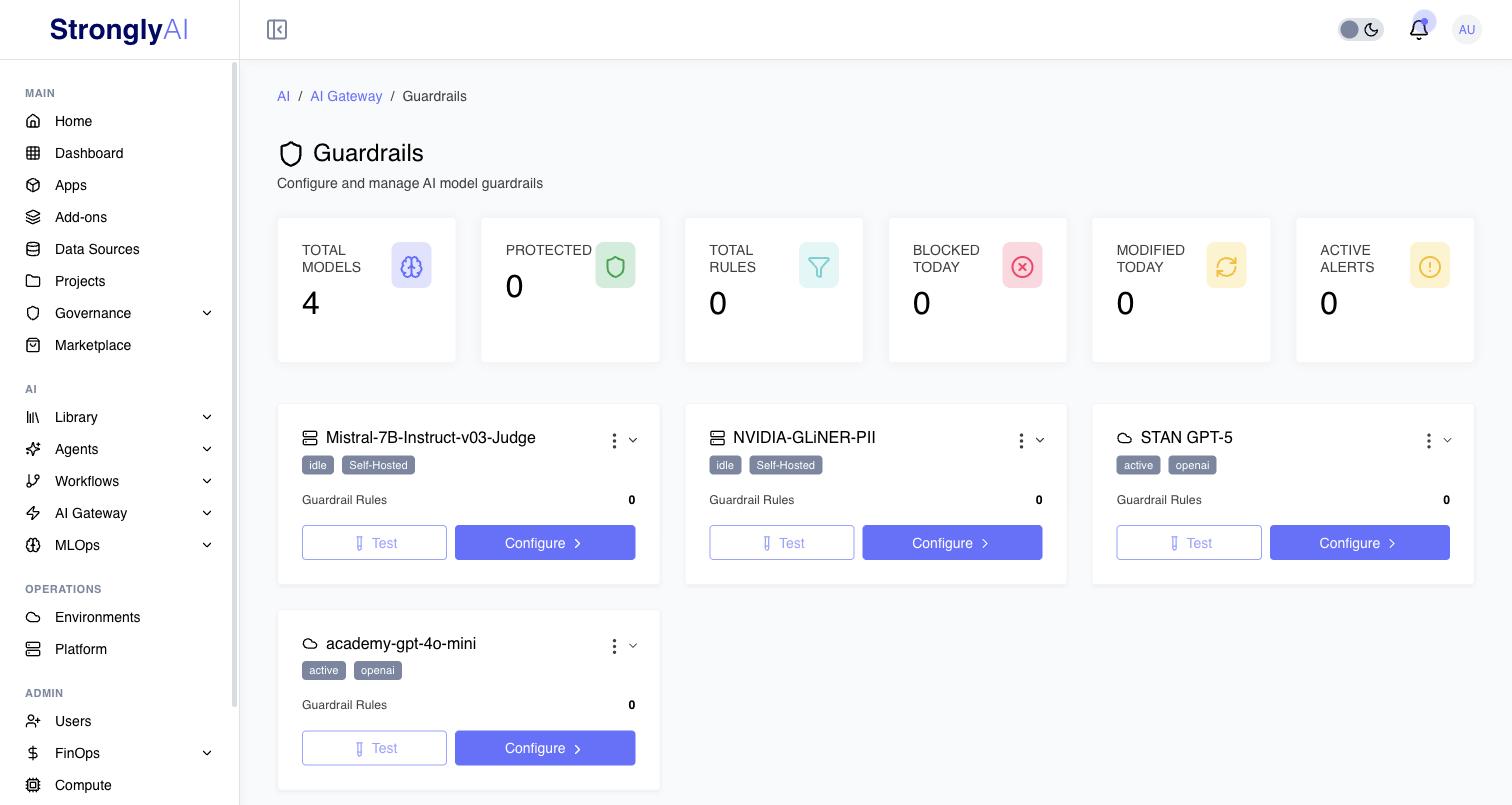
- The dashboard summarizes your fleet: total models, protected models (guardrails enabled), total active rules, and requests blocked and modified today
- Each model row shows its guardrail status and rule count. From here you can:
- Configure, open the model's guardrail configuration
- Duplicate to Another Model, copy this model's guardrail configuration to another model
- Export, download the configuration as JSON
The Guardrail Configuration Page
Configuring a model opens a tabbed editor:
Active Rules Tab
Lists every rule applied to the model. Enable or disable rules, edit their configuration, test them, or remove them.
Rule Templates Tab
The template library described above. Each template card shows its category and description; applying a template opens its configuration so you can adjust settings (detection types, actions, thresholds, keywords) before adding it to the model.
Activity Logs Tab
Recent guardrail activity for the model:
| Field | Description |
|---|---|
| Timestamp | When the evaluation occurred |
| Rule | Which rule fired |
| Type | input or output |
| Action | Blocked, modified, or passed |
| User | Who made the request |
| Details | How many rules triggered |
Settings Tab
Model-level guardrail settings.
Testing Rules
Each rule has a Test action that opens a test dialog:
- Enter sample content
- Select the direction (
inputoroutput) - Run the test
- Review which rules triggered, the action taken, and the confidence score for ML-based detection
Test rules with representative content before relying on them in production.
ML-Based Detection
The gateway uses ML models for higher-accuracy detection where available:
| Detection | Approach |
|---|---|
| Toxicity | Detoxify toxicity model with per-category confidence scores |
| PII | Microsoft Presidio analyzers plus spaCy named entity recognition |
| Hallucination | Zero-shot entailment (BART) consistency checking |
| Language | langdetect language identification |
Detection results are cached for 5 minutes to avoid re-computation on repeated content. When ML models are not available, the system uses keyword and regex pattern matching.
Integration with Governance Policies
Governance policies can require guardrails through a guardrail gate. The gate lists Required Guardrail IDs (for example pii-detection, toxicity) and optionally a Minimum Filter Level. On the solution page, the person completing the requirement checks that those guardrails are configured on their AI Gateway model and clicks Verify guardrails. The confirmation, who made it, and when are recorded on the requirement and in the governance audit log. It is a recorded confirmation: the gate does not inspect the model's guardrail configuration itself.
To stop an AI Gateway model from serving requests until a policy's requirements are met, add "All AI Gateway Model resources" to a solution and gate aiGatewayModel in the policy. See Enforcement.
Best Practices
Start with Essentials
Enable these rules on production AI models as a baseline:
- PII Data Filter (mask mode), protect sensitive data
- Toxicity Filter, block harmful content
- Prompt Injection Protection, protect against manipulation
- Rate Limiter, prevent abuse
Layer Security
- Use input rules to protect data sent to models (PII, injection, limits)
- Use output rules to protect users from harmful responses (data leaks, content, language)
- The PII filter and Data Leak Prevention complement each other: one guards prompts, the other guards responses
Test Before Deploying
Always use the per-rule test dialog to validate behavior with representative content before enabling on production models. Check for:
- False positives (legitimate content being blocked)
- False negatives (harmful content passing through)
- PII masking accuracy
Monitor and Tune
- Review the Activity Logs tab regularly to identify patterns
- Watch the dashboard's blocked/modified counts for spikes
- High false-positive rates suggest thresholds are too strict; adjust per rule
- Use Duplicate to Another Model to keep configurations consistent across a model fleet, and Export to keep configurations in version control