Data Sources
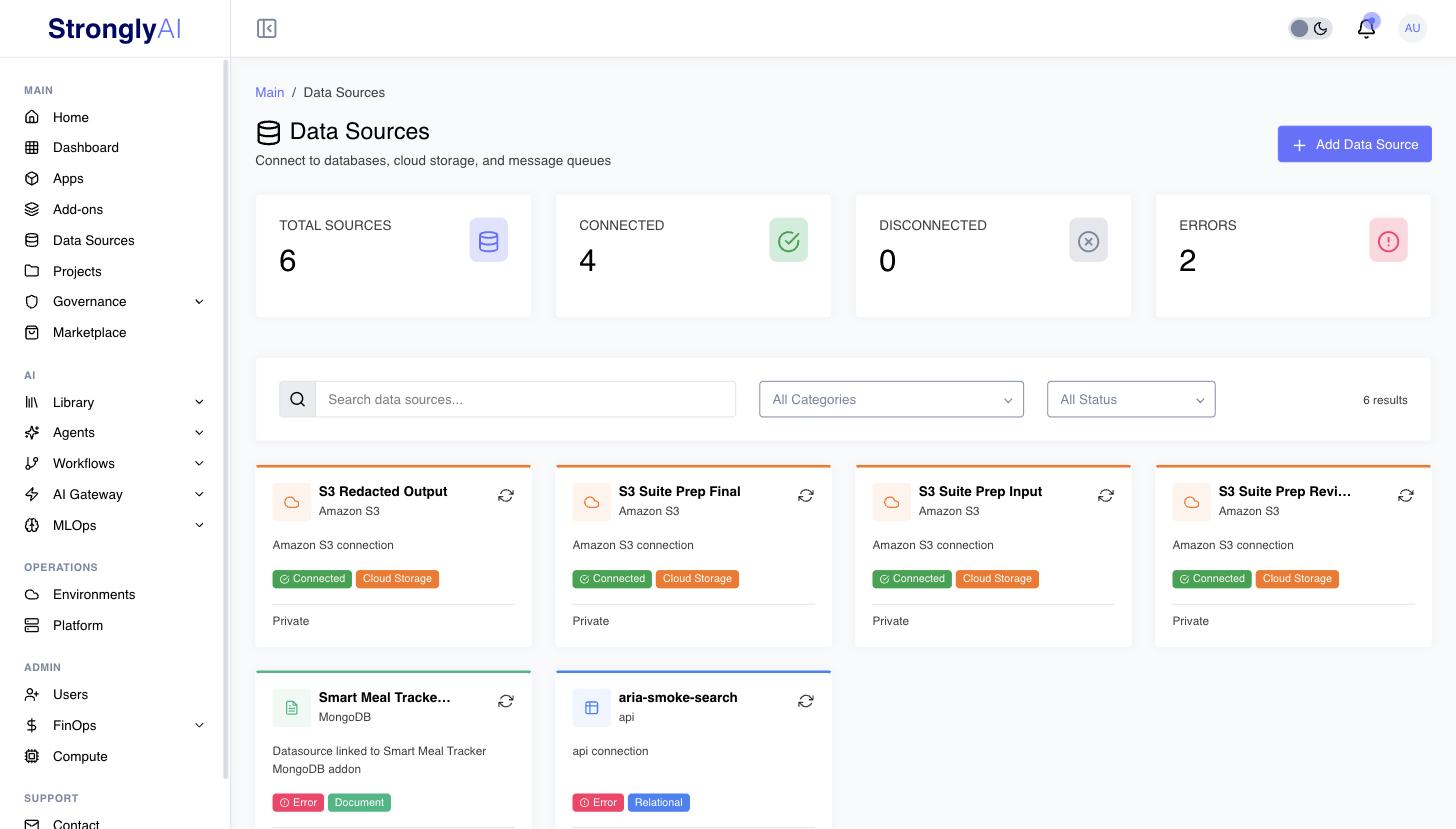
Connect to external databases, data warehouses, and cloud storage services. Once configured, these connections are available in your workflows via the STRONGLY_SERVICES environment variable.
Supported Data Source Types
Choose from 52 supported data source types across 9 categories:
| Category | Providers | Use Cases |
|---|---|---|
| Relational | MySQL, PostgreSQL, MSSQL, Oracle, Redshift, Snowflake, BigQuery, CockroachDB, CrateDB, TimescaleDB, QuestDB, ClickHouse, SingleStore, Greenplum, Supabase | Transactional data, structured queries, analytics |
| Document/NoSQL | MongoDB, Elasticsearch, DynamoDB, Firestore, CouchDB, Couchbase | Document storage, search, flexible schemas |
| Key-Value/Cache | Redis, Memcached | Caching, session storage, real-time data |
| Graph | Neo4j, Amazon Neptune, ArangoDB, TigerGraph | Graph relationships, knowledge graphs |
| Vector | Milvus, Pinecone, Weaviate, Qdrant, Chroma, pgvector, Vespa, Marqo | AI embeddings, semantic search, RAG systems |
| Multi-Model | SurrealDB | Multi-paradigm data modeling |
| Spreadsheet | Airtable, Google Sheets, Baserow, NocoDB, SeaTable, Grist | Low-code databases, spreadsheet data |
| Cloud Storage | Amazon S3, Google Cloud Storage, MinIO, Azure Blob Storage | File storage, data lakes, backups |
| Message Queue | RabbitMQ, Apache Kafka, Amazon SQS, Apache Pulsar, MQTT broker | Event streaming, message brokering, device telemetry |
Quick Links
- How to Connect Data Sources
- PostgreSQL Configuration
- MySQL Configuration
- MongoDB Configuration
- Snowflake Configuration
- BigQuery Configuration
- Amazon S3 Configuration
- Redis Configuration
Dedicated configuration pages exist for the most commonly used types listed above. All other types (MSSQL, Oracle, Redshift, Elasticsearch, DynamoDB, Neo4j, Pinecone, Kafka, etc.) follow the same general creation workflow described in How to Connect Data Sources. The creation form dynamically renders the correct credential fields for every supported type.
Using Data Sources in Workflows and Apps
When a data source is attached to your workflow or app, its decrypted connection details are injected via the STRONGLY_SERVICES environment variable. Data sources are grouped by type under services.datasources, and each entry is one configured connection with connection and auth sections.
STRONGLY_SERVICES Structure
{
  "version": "2.0",
  "environment": "development",
  "services": {
    "datasources": {
      "postgres": [
        {
          "id": "abc123",
          "name": "prod-postgres",
          "type": "postgres",
          "category": "data-source",
          "status": "connected",
          "connection": {
            "host": "postgres.example.com",
            "port": 5432,
            "database": "myapp",
            "ssl": { "enabled": true }
          },
          "auth": {
            "method": "username_password",
            "credentials": {
              "username": "app_user",
              "password": "<password>"
            }
          },
          "metadata": {
            "owner": "<user-id>",
            "tags": ["production"]
          }
        }
      ]
    }
  }
}
The connection fields vary by type. For example, S3 entries have connection.bucket and connection.region with auth.method: "aws_access_key"; BigQuery entries have connection.project_id and connection.dataset_id with auth.method: "service_account"; Snowflake entries have connection.account, connection.warehouse, and connection.database. See the per-type pages for the exact shapes.
Python Example -- PostgreSQL
import os, json
import psycopg2

# Parse STRONGLY_SERVICES environment variable
services = json.loads(os.environ['STRONGLY_SERVICES'])

# Data sources are grouped by type; pick yours by name (its label)
pg = next(
    d for d in services['services']['datasources']['postgres']
    if d['name'] == 'prod-postgres'
)

# Connect using the connection and auth sections
conn = psycopg2.connect(
    host=pg['connection']['host'],
    port=pg['connection']['port'],
    database=pg['connection']['database'],
    user=pg['auth']['credentials']['username'],
    password=pg['auth']['credentials']['password']
)

# Execute queries
cursor = conn.cursor()
cursor.execute("SELECT * FROM users WHERE active = true")
users = cursor.fetchall()
Node.js Example -- MongoDB
const { MongoClient } = require('mongodb');

// Parse STRONGLY_SERVICES environment variable
const services = JSON.parse(process.env.STRONGLY_SERVICES);
const mongo = services.services.datasources.mongodb
  .find(d => d.name === 'prod-mongodb');

// Build connection string from connection and auth sections
const { host, port, database } = mongo.connection;
const creds = mongo.auth ? mongo.auth.credentials : null;
const authPart = creds ? `${creds.username}:${creds.password}@` : '';
const url = `mongodb://${authPart}${host}:${port}/${database}`;

// Connect
const client = new MongoClient(url);
await client.connect();
const db = client.db(database);

// Query
const users = await db.collection('users').find({ active: true }).toArray();
Workspaces: STRONGLY_DATA_SOURCES
Workspaces receive attached data sources through a separate STRONGLY_DATA_SOURCES environment variable: a flat object keyed by the data source name (lowercased, non-alphanumeric characters replaced with underscores, e.g. prod-postgres becomes prod_postgres). Each entry has type, name, all credential fields at the top level, and a connectionString for supported types (MySQL, PostgreSQL, MongoDB, Redis, MSSQL, Oracle, Redshift, Snowflake, Neo4j, ClickHouse).
Security
Credential Encryption
All credentials are encrypted at rest. The encryption key is configured via the API_KEY_ENCRYPTION_SECRET environment variable (minimum 32 characters required). Credentials are never sent to the client -- they are excluded from all publications and only decrypted server-side when needed for connection testing, metadata fetching, or building STRONGLY_SERVICES.
Permission Model
Data sources support three levels of access control:
- Private (default): Only the owner can access the data source
- All Users (
allowAllUsers): All users in the organization can use the connection - Specific Users (
allowedUsers): Only selected users can access the data source
Permissions are managed through the datasources.updatePermissions, datasources.share, and datasources.unshare methods. In multi-tenant (SaaS) mode, sharing is restricted to users within the same organization.
Managing Data Sources
View Connection Details
- Click data source name to view details page
- See connection string (passwords masked)
- View metadata: tables, schemas, databases, collections, buckets
- Check last tested time and status
Test Connection
The platform automatically tests the connection when creating or updating a data source. You can also manually trigger a test using the Test Connection button on the data source details page. The test result updates the data source status to connected or error.
For types with native driver support (MySQL, PostgreSQL, MongoDB, Redis, S3/MinIO, Snowflake, BigQuery, Oracle, MSSQL, Neo4j, Elasticsearch, Redshift, ClickHouse, QuestDB, DynamoDB, SQS, GCS), the platform performs an actual connection test (e.g., SELECT 1, ping, ListBuckets). For other types, credentials are saved with a message indicating verification will happen at runtime.
Schema Discovery
After connecting, use Refresh Metadata to discover the structure of your data source. Depending on the type, this returns:
- Tables/Collections: Available tables or collections
- Schemas: Database schemas (PostgreSQL, Snowflake, Redshift, Oracle, etc.)
- Databases: Available databases
- Buckets: S3/cloud storage buckets
- Size and row counts: Approximate storage size and row counts
Full native metadata connectors are available for: MySQL, PostgreSQL, MongoDB, Redis, S3, MinIO, Snowflake, BigQuery, Oracle, Redshift, Neo4j, and PostgreSQL-compatible databases (CockroachDB, CrateDB, TimescaleDB, Greenplum, pgvector, QuestDB) and MySQL-compatible databases (SingleStore). Other types use a generic HTTP-based connector that returns empty metadata.
Additionally, you can fetch column-level metadata for individual tables using the table columns feature (supported for MySQL, PostgreSQL, Oracle, Redshift, Snowflake, BigQuery, and MongoDB).
Update Credentials
- Click Edit button
- Update label, description, credentials, or tags
- Connection is re-tested automatically when credentials change
- Click Save to apply changes
Usage Tracking
- The Overview tab shows Times used and Last used
- A use is counted each time an app, workspace or job deploys or starts with the data source, or a workflow run is given it
Delete Data Source
- Click Delete: the dialog first lists the apps, workspaces, jobs and workflows that use the data source, and Delete stays disabled while anything does
- Once nothing uses it, confirm the deletion (irreversible); its permissions are removed with it
Credentials are encrypted at rest and are never sent to the browser with the data source. Only the owner and administrators can read them (the Connection tab and the edit dialog load them on demand); workloads receive them only through STRONGLY_SERVICES.