Workflows
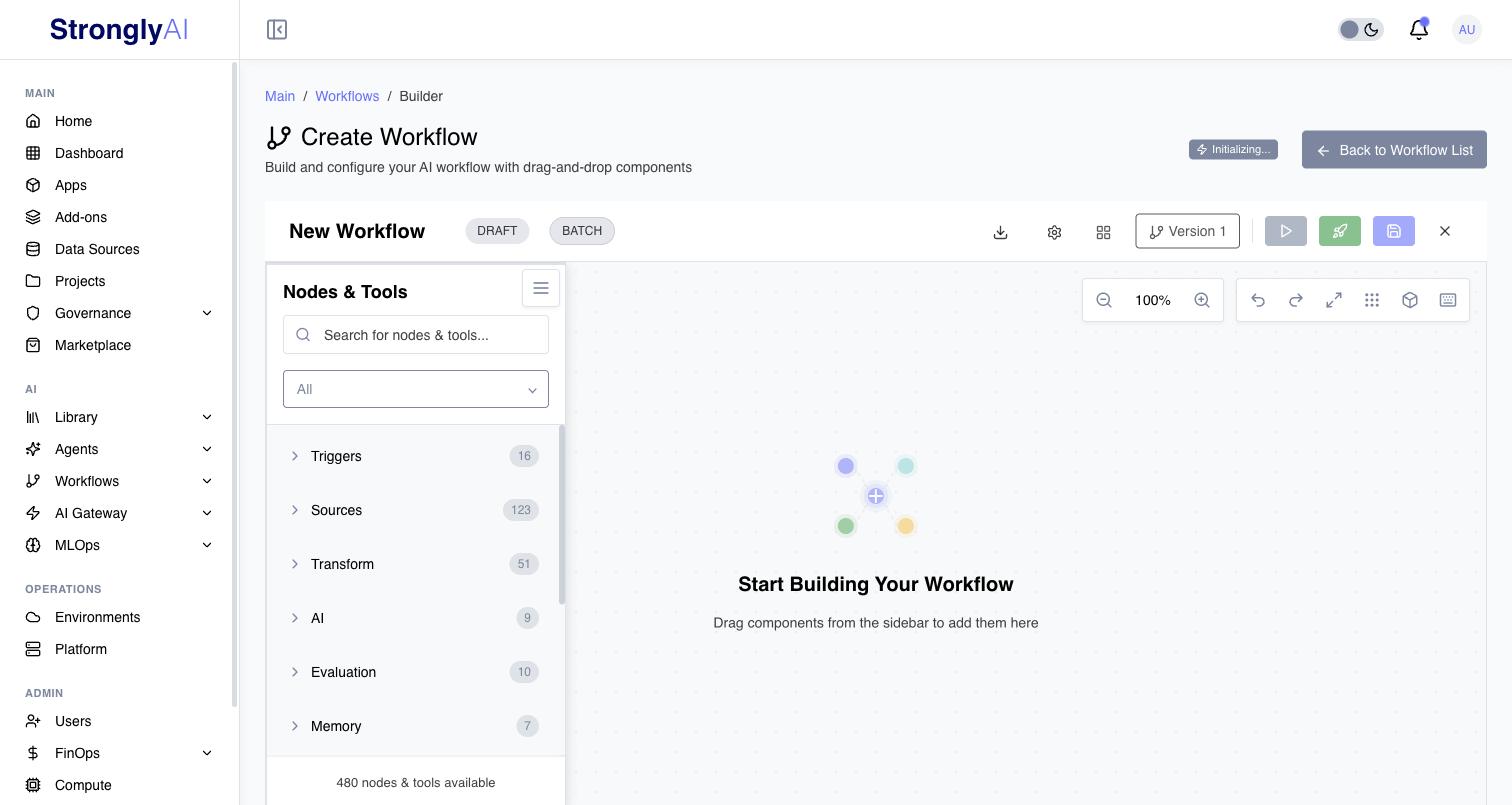
Build and execute DAG-based AI pipelines on Kubernetes. Design workflows conversationally with the STAN AI assistant or using the visual node editor. Chain together 480 nodes and tools across data sources, transformations, AI models, agents, control flow, and destinations -- with full execution tracing and real-time monitoring.
What are Workflows?
Workflows are directed acyclic graph (DAG) pipelines that execute on Kubernetes. Each workflow is composed of interconnected nodes that define a data processing pipeline. Workflows can be built in two ways:
- STAN AI Assistant: A conversational AI agent that builds workflows through natural language. STAN understands the full node catalog, can configure nodes, wire connections, and iterate on designs interactively.
- Visual Node Editor: A drag-and-drop canvas interface for manually assembling and configuring workflow nodes.
Each workflow consists of:
- Trigger: The event that initiates the workflow (16 trigger types available)
- Processing Nodes: Components that transform, analyze, route, or act on data
- Destinations: Where processed data is delivered
Architecture
Workflows run on a Kubernetes-native execution engine with the following characteristics:
- DAG Execution: Nodes execute in dependency order with automatic parallelization of independent branches.
- Fast Execution: Dedicated compute resources are pre-provisioned per organization for low-latency execution dispatch.
- STRONGLY_SERVICES: A dynamic service discovery mechanism that provides workflow nodes with access to platform services (AI models, databases, add-ons). The configuration is injected as a JSON environment variable so nodes can connect to user-selected services at runtime.
- Automatic Retry: Failed executions can be automatically retried.
- Distributed Execution: Workflows can execute across multiple zones for parallel processing and fault tolerance.
Node Catalog
The builder's node palette provides 480 nodes and tools across 11 categories (counts grow with each release):
| Category | Count | Examples |
|---|---|---|
| Tools | 152 | Web Search, Code Interpreter, Web Browser, File Manager, Calculator, API Caller |
| Sources | 123 | PostgreSQL, MySQL, MongoDB, S3, Salesforce, Jira, Slack, Google Sheets, REST API |
| Destinations | 66 | PostgreSQL, MongoDB, S3, Slack, Email (SMTP/SendGrid), Teams, Webhook Response |
| Transform | 51 | Code, AI Transform, Filter, Aggregate, PDF Parser, Excel Parser, Text Chunker |
| Control Flow | 23 | Conditional, Loop, Map, Parallel Branch, Switch/Case, Sub-Workflow, Human Checkpoint |
| Triggers | 16 | Webhook, Schedule, REST API, Chat, Email, Form, File, RSS Feed, SSE, Error |
| Agents | 16 | ReAct Agent, Multi-Agent Chat, RAG Agent, Supervisor Agent, Planner, Reflection |
| Evaluation | 10 | LLM as Judge, Faithfulness Checker, RAG Metrics, Guardrails, Cost Tracker |
| AI | 9 | AI Gateway, LLM, Embeddings, Vision, Image Generation, Speech-to-Text, Text-to-Speech |
| Memory | 7 | Conversation Memory, Knowledge Base, Semantic Memory, Working Memory |
| Operators | 7 | MCP Tools Provider (connects to external MCP servers for tool access) |
Trigger Types
Workflows support 16 trigger types, including:
| Trigger | Node ID | Description |
|---|---|---|
| Webhook | webhook | HTTP requests with HMAC signature verification |
| Schedule | schedule | Time-based execution (intervals, daily, cron expressions) |
| REST API | rest-api | Authenticated API endpoints |
| Chat | chat-trigger | Conversational input for chat-based workflows |
email-trigger | New emails in an IMAP mailbox, checked every Poll Interval | |
| Form | form | Form submissions with validation |
| File | file-trigger | New or updated files in an S3 data source, checked every Poll Interval |
| RSS Feed | rss-trigger | New RSS/Atom feed items, checked every Poll Interval |
| SSE | sse-trigger | Server-Sent Events stream |
| Error | error-trigger | Starts when a run of another workflow in your organization fails |
| Multi-Modal Input | multi-modal-input | Combined text, image, audio, and file input |
| Event | event | Platform event subscriptions |
| Queue | queue | Message-queue consumption |
| Batch Subscribe | batch-subscribe | Processes recorded streaming sessions in batch (the streaming-to-batch hand-off) |
| Agent Trigger | agent-trigger | Invocation by an agent |
| Task Due | task-due-trigger | Fires when a scheduled task becomes due |
Streaming workflows have their own trigger set (for example WebSocket and WebRTC streaming triggers) in the streaming palette.
Execution Modes
Batch vs Streaming
Every workflow is either a Batch or a Streaming workflow. Pick the type with the Batch/Streaming pill next to the workflow's status badge in the builder -- click it to switch while the canvas is empty. Once nodes are on the canvas the type is locked (remove all nodes to change it).
The two types support different setups:
- Batch -- run-to-completion pipelines. The palette offers the full batch node catalog, and deployment includes a Lifecycle Policy that controls how the workflow runs when deployed (affecting cost and availability).
- Streaming -- continuous, session-based pipelines (live audio, WebRTC, SSE, WebSocket). The palette switches to the streaming node set and the model pickers that give its nodes their models, and the builder opens a live test panel so you can exercise the stream while you build. See Streaming Workflows.
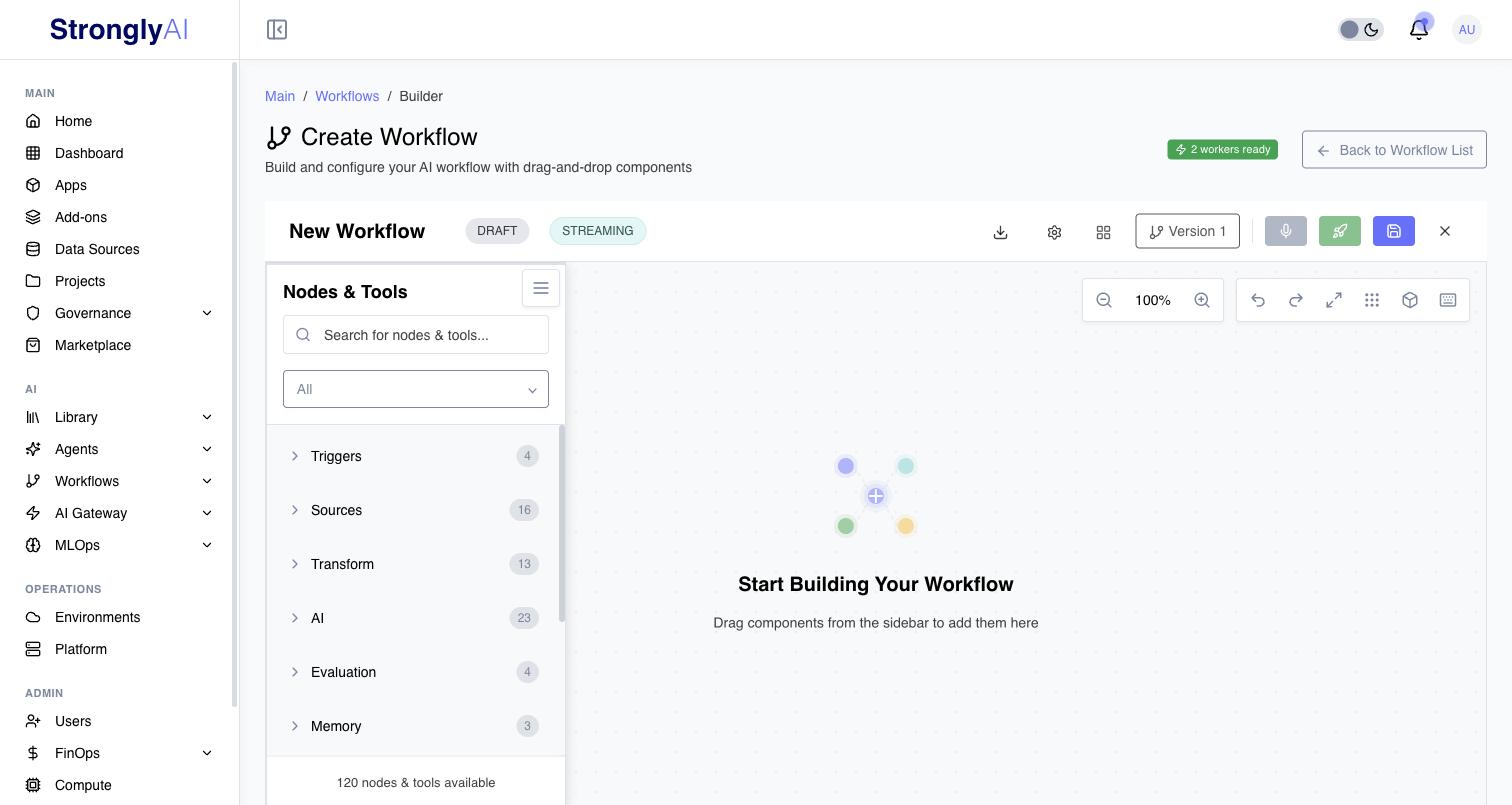
The Workflow Monitor shows the Batch/Streaming split across your workflows.
How workflows run
Batch workflows can be executed in several ways:
- Manual: On-demand execution from the UI or API.
- Scheduled: Recurring execution on an interval or cron expression.
- Webhook/API Triggered: External systems invoke workflows via HTTP endpoints.
Streaming workflows run as live sessions: a client opens a session and data flows through the pipeline continuously until the session ends.
Key Features
STAN AI Assistant
STAN is a conversational AI agent that builds and configures workflows through natural language interaction. STAN operates in two modes:
- NEW mode: Creates workflows from scratch based on requirements described in plain language.
- ACTIVE mode: Modifies and iterates on an existing workflow loaded in the editor.
STAN has access to the full node catalog, can configure node parameters, establish connections between nodes, and apply workflow templates. It uses MCP (Model Context Protocol) tools to interact with the workflow builder programmatically.
Visual Node Editor
- Drag-and-drop interface for assembling workflow nodes
- Real-time execution visualization on the canvas
- Node connections define data flow between components
- Canvas organization, grouping, and layout tools
Execution Infrastructure
Each organization has dedicated compute resources for workflow execution:
- Pre-provisioned resources reduce execution start time.
- Automatic scaling adjusts capacity based on demand.
- Resource reuse returns compute resources after execution completes, enabling efficient utilization.
Execution Tracing
Every workflow execution produces detailed tracing data:
- Per-node spans with timing, status, inputs, and outputs tracked per node.
- Real-time progress reporting with status updates as each node completes.
- Execution timeline with node durations for performance analysis.
- Console logs and error messages captured per node.
- Performance metrics including success rate, duration, and throughput.
Versioning
- Integer-based version numbers that auto-increment on each save.
- Each deployment creates a versioned snapshot of the workflow definition.
- Version history is maintained for audit and comparison.
Sharing and Collaboration
- Share workflows with specific users within an organization.
- Clone existing workflows to create copies.
- Create and apply workflow templates for common patterns.
STRONGLY_SERVICES
STRONGLY_SERVICES is a JSON configuration injected into workflow workers that provides dynamic access to platform services:
- AI Models: Users select which AI Gateway models to use; the selected model configuration is available to AI nodes at runtime.
- Databases: Connection details for PostgreSQL, MySQL, MongoDB, and other data sources.
- Add-ons: Third-party service integrations configured at the platform level.
Multiple services of the same type can be configured, and users select which service each node should use during workflow configuration.
Three-Tier Caching
Data handed between nodes is cached in three tiers, chosen per item by its size:
- L1: Memory: items up to 100 KB, in the worker pod's memory, for the fastest reads.
- L2: Disk: items up to 10 MB, on the worker pod's local disk.
- L3: Object storage: every item of any size, shared by every pod of the run, so scaled loops and resumed runs read the same data.
See How Workflows Run for lifetimes and cleanup, and for the worker pool that runs your drafts, closing loops with a Loop Accumulator, threads and pods, and node metrics.
Waiting for a Person
Three nodes pause a run until a person answers:
- Wait for Input waits for data (checked against its Input Schema when you set one).
- Human Feedback asks for free text, a rating, one of a list of choices, or a form.
- Human Checkpoint shows the data under review and waits for Approve or Reject, with a message and any Input Fields you defined. The run continues on the Approved or Rejected port. With Approvers set (picked from your organization's users, or yourself), only they can decide; they are notified in-app, by email or through a webhook, as you choose under Notification Channels.
While a run waits, the builder shows a Waiting for you panel with each pending request and the control to answer it; the run continues within seconds of your answer. The run's status stays Running while it waits. Each node's Timeout decides what happens when nobody answers. The same requests are answered through the REST API (GET /workflows/-/executions/{id}/human-requests, then POST /executions/{id}/input) and the Python SDK (executions.pending_inputs, executions.submit_input).
Automatic Retry
Failed executions can be:
- Inspected for failure details and error context.
- Retried automatically based on configured retry settings.
- Retried manually after the underlying issue is resolved.
Monitoring and Observability
The Workflow Monitor (Workflows > Monitor) shows every workflow with its status, type, owner, last execution, and execution count, plus totals across development and production. An agent counts as active (production) while it runs, including while an on-demand agent is idle at zero, and as draft when it is stopped; the status filter uses the same reading:
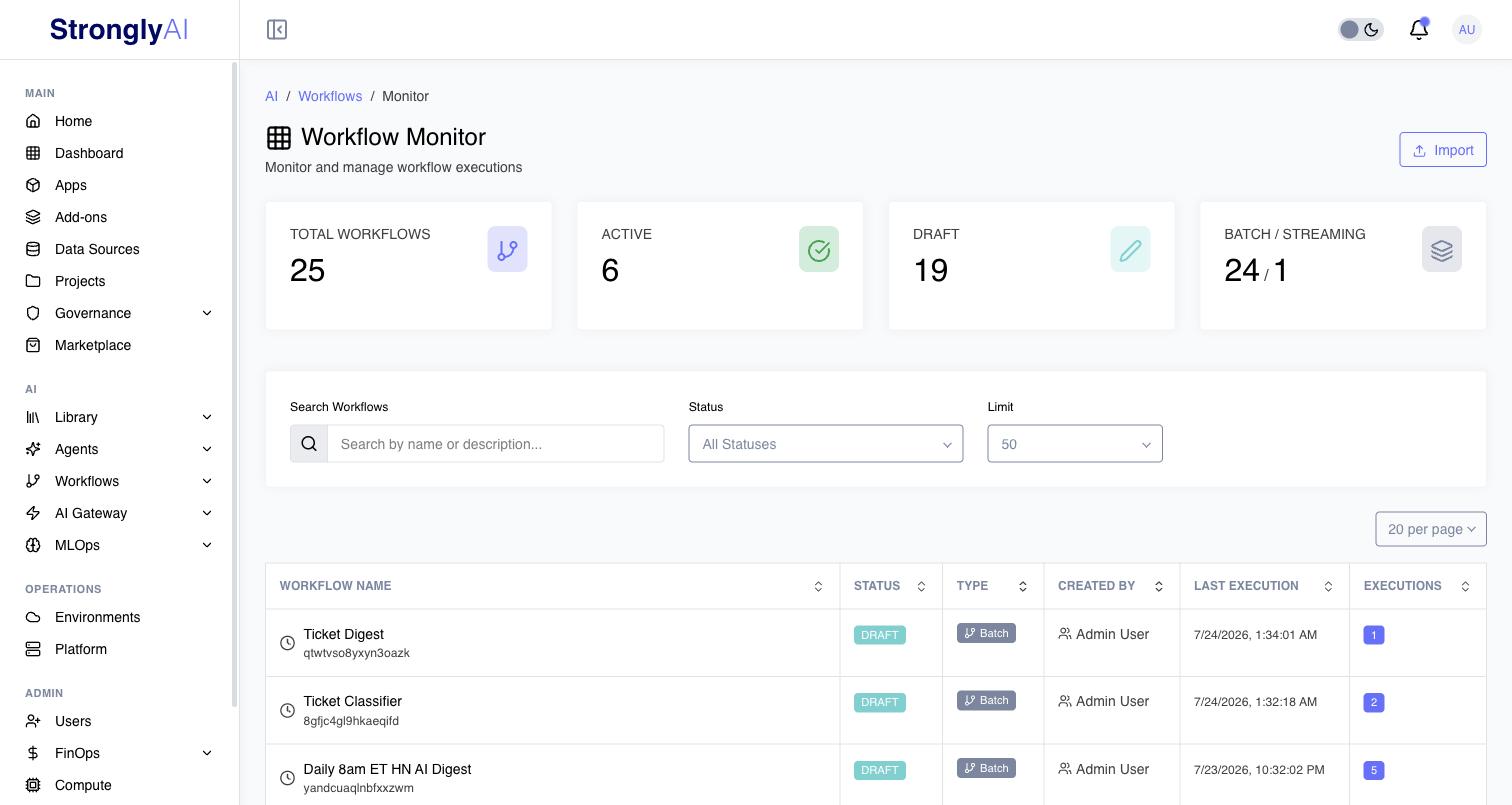
Every workflow execution provides:
- Real-time status updates via reactive subscriptions
- Execution timeline with per-node durations
- Input/output data inspection for each node
- Console logs and error messages
- Performance metrics (success rate, average duration, throughput)
- Resource utilization and availability monitoring
Use Cases
Workflows are designed for:
- Data Processing Pipelines: Extract, transform, and load data from 121+ source connectors into 23+ destinations.
- AI-Powered Automation: Chain AI models, agents, and evaluation nodes for complex analysis and decision-making.
- Agentic Workflows: Build multi-agent systems with ReAct, RAG, and Supervisor agents that use tools and memory.
- Event-Driven Integrations: React to webhooks, emails, RSS feeds, SSE streams, and file events.
- Scheduled Tasks: Run recurring jobs, data synchronization, and report generation via CronJobs.
- Document Analysis: Parse PDFs, Excel files, Word documents, and emails, then process with AI.
- Multi-System Integration: Connect databases, APIs, cloud services, and SaaS platforms in a single pipeline.
- Chat Applications: Build conversational workflows with chat triggers, memory, and AI agents.
Start with simple workflows and gradually add complexity. Use STAN AI assistant to quickly scaffold workflows, then fine-tune in the visual editor. Test thoroughly before deploying to production.
Getting Started
- Creating Workflows - Step-by-step guide to building workflows
- Workflow Nodes - Available node types and configuration
- Workflow Triggers - Trigger types and configuration
- Testing Workflows - Test and debug your workflows
- Deploying Workflows - Deploy to production