STAN (Strongly Technical AI Navigator)
STAN is Strongly.AI's AI-powered workflow builder and platform assistant. Powered by large language models through the platform's AI Gateway, STAN can build complete workflows from natural language descriptions, modify existing workflows, discover and configure platform services, and execute and test workflows -- all through a conversational chat interface.
What STAN Does
STAN is not a simple chatbot. It is an autonomous AI agent with access to the full workflow building toolchain via the Model Context Protocol (MCP). STAN can:
- Build complete workflows from a natural language description
- Modify existing workflows that are open in the workflow builder
- Discover your services (AI models, add-ons, data sources) and configure nodes to use them
- Deploy and execute workflows with a single command
- Test workflows and inspect execution results at the node level
- Access the full workflow node catalog (480 nodes and tools across 11 categories)
- Use pre-built templates for common workflow patterns
Two Operating Modes
STAN operates in two distinct modes depending on context:
NEW Mode -- Creating Workflows from Scratch
When you open STAN without a workflow selected, it enters NEW mode. In this mode, STAN follows this process:
- Understands your requirement from natural language
- Creates a new workflow with
create_workflow - Validates and adds nodes from the catalog using
validate_node_typeandadd_node - Connects nodes to establish data flow using
connect_nodes - Discovers your available services (AI models, databases, storage) using service discovery tools
- Configures nodes with your actual service connections using
configure_node - Arranges the workflow visually using
auto_layout - Saves or deploys the workflow
Example conversation in NEW mode:
You: Create a workflow that reads PDF files from S3, extracts the text, summarizes each document with AI, and saves the summaries to PostgreSQL.
STAN: I'll build that workflow for you. Let me first check what services you have available...
STAN calls
list_user_datasources("s3")to find your S3 connections STAN callslist_user_models()to find your AI models STAN callslist_user_addons("postgres")to find your PostgreSQL databasesSTAN: I found your S3 connection "production-bucket", your GPT-4 model, and your PostgreSQL add-on "analytics-db". Building the workflow now...
STAN creates the workflow, adds nodes, connects them, configures each with your actual services, and auto-layouts
STAN: Your workflow "PDF Summarizer" is ready with 5 nodes: Schedule -> S3 Source -> PDF Parser -> AI Gateway -> PostgreSQL Dest. Would you like me to deploy it?
ACTIVE Mode -- Modifying Existing Workflows
When you open STAN from within the workflow builder with a workflow already loaded, it enters ACTIVE mode. In this mode:
- STAN knows the current workflow ID and its existing nodes and connections
- STAN will not create a new workflow -- it modifies the one you have open
- You can ask STAN to add nodes, remove nodes, change connections, reconfigure settings, test, or deploy
Example conversation in ACTIVE mode:
You: Add an email notification node that sends an alert when the workflow fails.
STAN: I'll add an error handling branch to your workflow...
STAN adds a switch-case node, connects it to detect errors, adds an email-dest node, and configures it
STAN: Done. I added a switch-case node after your AI Gateway that checks for errors, and connected the error branch to a new Email Notification node. Would you like me to save?
Available MCP Tools
STAN has access to the following tools, organized by category:
Node Discovery Tools
These tools help STAN find and validate the correct node types:
| Tool | Description |
|---|---|
validate_node_type | Verify that a node type exists in the catalog before using it. Returns validity status and suggestions for similar nodes if not found. |
search_nodes | Search for nodes by keyword and optional category filter. Returns matching nodes with type, name, category, description, and tags. |
get_node_schema | Get detailed configuration schema for a specific node type including input/output definitions, configuration fields, dependencies, and examples. |
Workflow Creation Tools
| Tool | Description |
|---|---|
create_workflow | Create a new empty workflow with a name (max 18 characters) and description. Returns a workflow ID for all subsequent operations. |
rename_workflow | Rename an existing workflow and optionally update its description. |
Node Management Tools
| Tool | Description |
|---|---|
add_node | Add a node to the workflow by specifying its type from the catalog. Returns the node instance ID and position. |
remove_node | Remove a node from the workflow. Also removes all connections to and from the node. |
move_node | Move a node to specific x,y coordinates on the workflow canvas. |
configure_node | Set or update configuration values on a node (e.g., database connection, AI model, query parameters). |
set_input_mapping | Map data from previous node outputs to this node's inputs using JSONPath syntax (e.g., $.output.rows). |
Connection Tools
| Tool | Description |
|---|---|
connect_nodes | Create a data flow connection between two nodes. Supports named ports (source port, target port). Automatically repositions the target node for optimal left-to-right flow. |
disconnect_nodes | Remove the connection between two nodes. |
Workflow State Tools
| Tool | Description |
|---|---|
get_workflow_summary | Get a complete summary of the workflow: all nodes, connections, and any validation issues. |
validate_workflow | Validate the workflow for completeness -- checks for trigger nodes, connectivity, required configurations, and circular dependencies. |
save_workflow | Save the workflow without deploying. Persists all changes. |
finalize_workflow | Save and optionally deploy the workflow. When deploy=true, the workflow becomes active and starts processing data. |
Testing and Execution Tools
| Tool | Description |
|---|---|
test_workflow | Run a test execution of the workflow with optional sample inputs. Supports dry-run mode for validation without execution. |
get_execution_status | Check the status, progress percentage, and per-node execution details of a running or completed execution. |
get_node_output | Get the actual output data from a specific node in an execution. Useful for debugging data flow. |
stop_execution | Stop a running execution and clean up all associated resources. |
Service Discovery Tools
These tools are critical for proper workflow configuration. STAN uses them to discover what services you have available before configuring nodes:
| Tool | Description |
|---|---|
list_user_models | List all AI models available to the user, optionally filtered by provider (OpenAI, Anthropic, vLLM) or type (chat, embedding, multimodal). Returns model IDs for use with configure_node. |
list_user_addons | List all managed add-ons (databases, caches, message queues) available to the user, optionally filtered by type (mongodb, redis, postgres) or status. Returns add-on IDs for use with configure_node. |
list_user_datasources | List all external data source connections available to the user, optionally filtered by type (mysql, postgres, s3) or category (relational, document, cloud-storage, vector). Returns data source IDs for use with configure_node. |
Layout Tools
| Tool | Description |
|---|---|
auto_layout | Automatically arrange all nodes in a professional left-to-right DAG layout. Trigger nodes go on the left, linear chains flow horizontally, branches distribute vertically, and merge nodes center between inputs. |
Node Catalog
STAN has access to a catalog of 480 workflow nodes and tools. Nodes are organized into 11 categories:
| Category | Examples |
|---|---|
| Triggers | schedule, webhook, rest-api, email-trigger, form |
| Sources | s3-source, mysql-source, postgresql-source, mongodb-source, rest-api |
| Transform | set-fields, to-file, pdf-parser, code, filter, sort, aggregate |
| AI | ai-gateway, embeddings, vision, text-to-speech |
| Evaluation | Quality and performance evaluation nodes |
| Memory | Vector stores and conversation memory |
| Agents | react-agent, supervisor-agent |
| Control Flow | switch-case, loop, parallel-branch, merge, wait |
| Destinations | s3-dest, mysql-dest, postgresql-dest, mongodb-dest, email-dest, webhook-response |
| Tools | mcp-tools-provider and other utility tools |
| Utilities | delay, logger, error-handler |
The catalog is loaded into memory at startup and refreshed every 5 minutes. Each node has a compact description for STAN's system prompt and full documentation available via get_node_schema.
MCP Server Nodes
Some nodes in the catalog are MCP servers (external tools like brave-search, markitdown). These require special handling:
- MCP servers cannot be used directly in workflows
- They must be connected to an agent node (
react-agentorsupervisor-agent) - The agent needs an AI Gateway connection to reason about tool use
- Use
mcp-tools-providerto connect MCP servers to agents
STAN knows to prefer native workflow nodes over MCP servers when the functionality exists (e.g., use pdf-parser node instead of markitdown MCP server).
Service Configuration Rules
STAN follows strict rules when configuring nodes that connect to external services:
AI Gateway Nodes
For nodes like ai-gateway, embeddings, vision:
- STAN calls
list_user_models()to discover available models - If models found: configures node with
{ model: "<model_id>" } - If no models found: tells you to configure AI models in AI Gateway first
Database Source/Destination Nodes
For every node of an add-on type (PostgreSQL, MySQL, MongoDB, Redis, Neo4j, Milvus, RabbitMQ, Greenplum, SurrealDB, Kafka, MQTT), such as mysql-source, postgresql-source, mongodb-dest:
Databases support two connection types. STAN discovers both:
- Add-ons -- Managed databases:
list_user_addons("postgres") - Data Sources -- External connections:
list_user_datasources("postgres")
Configuration depends on what is found:
- Add-on:
{ connectionType: "addon", addonId: "<id>" } - Data source:
{ connectionType: "datasource", dataSourceId: "<id>" } - Neither: STAN tells you to set up a database connection first
Storage Nodes
For S3 and similar storage nodes:
- STAN calls
list_user_datasources("s3")for S3 connections - STAN calls
list_user_addons("minio")for MinIO add-ons - Configures with
{ dataSourceId: "<id>" }
Node Configuration Reference
STAN uses these exact field names when configuring common node types:
| Node Type | Configuration Fields |
|---|---|
ai-gateway | model, defaultTemperature, defaultMaxTokens, defaultSystemPrompt, defaultUserPrompt, infoOnly |
mysql-source | connectionType, addonId, dataSourceId, query, limit |
postgresql-source | connectionType, addonId, dataSourceId, query, schema, limit |
mongodb-source | connectionType, addonId, dataSourceId, collection, operation, database |
s3-source | dataSourceId, operation, prefix, maxFiles |
rest-api | url, method, timeout, authType, authConfig |
react-agent | maxIterations, systemPrompt, temperature, maxTokensPerCall |
switch-case | Condition routing configuration |
schedule | Cron is configured at deployment time, not in node config |
Workflow Templates
STAN has access to pre-built workflow templates for common patterns. Templates accelerate development by providing proven structures:
Data Integration Templates
| Template | Nodes | Description |
|---|---|---|
| MySQL to S3 Export | schedule -> mysql-source -> to-file -> s3-dest | Daily export of database data to S3 as CSV |
| API Data to MongoDB | schedule -> rest-api -> set-fields -> mongodb-dest | Hourly API data sync to MongoDB |
| PostgreSQL to MySQL Sync | schedule -> postgresql-source -> set-fields -> mysql-dest | Cross-database synchronization |
API Automation Templates
| Template | Nodes | Description |
|---|---|---|
| Webhook to Database | webhook -> set-fields -> postgresql-dest -> webhook-response | Process webhook payloads and store data |
| REST API Aggregation | schedule -> parallel-branch -> [rest-api x3] -> merge -> s3-dest | Fetch from multiple APIs in parallel |
Document Processing Templates
| Template | Nodes | Description |
|---|---|---|
| PDF to Text Pipeline | schedule -> s3-source -> pdf-parser -> set-fields -> mongodb-dest | Extract text from PDFs and store |
| Document Classification | webhook -> pdf-parser -> ai-gateway -> switch-case -> [multiple dests] | AI-powered document routing |
AI/ML Templates
| Template | Nodes | Description |
|---|---|---|
| LLM Chat Pipeline | webhook -> ai-gateway -> webhook-response | Simple AI chat endpoint |
| RAG Pipeline | webhook -> embeddings -> vector-search -> ai-gateway -> webhook-response | Retrieval-augmented generation |
Notification Templates
| Template | Nodes | Description |
|---|---|---|
| Scheduled Report | schedule -> postgresql-source -> to-file -> email-dest | Database report delivery |
| Alert Pipeline | webhook -> switch-case -> email-dest | Conditional email alerts |
Workflow Patterns
STAN understands and can implement these advanced patterns:
Mixed File Type Processing
When processing files of different types (PDF, ZIP, images):
- Source node reads files from storage
- Loop node iterates through files
- Switch-case node routes by file extension
- Each branch uses the appropriate processor (pdf-parser, image processor, etc.)
- Merge node combines results
Conditional Routing
When routing data to different destinations based on conditions:
- Switch-case node evaluates conditions after the data source
- Each output connects to a different handler
- Each branch can have multiple sequential nodes
Per-Row Database Processing
When processing each row individually from a database:
- Database source node queries data
- Loop node iterates through rows
- Processing nodes transform each row
- Destination or aggregation node collects results
API Aggregation (Parallel)
When fetching from multiple APIs simultaneously:
- Trigger node (webhook or schedule)
- Parallel-branch node splits execution
- Multiple rest-api nodes run concurrently
- Merge node combines all results
Agent with MCP Tools
When using external tools that require AI reasoning:
- Add an agent node (
react-agentorsupervisor-agent) - Connect an
ai-gatewaynode to the agent's AI connector - Connect an
mcp-tools-providernode to the agent's tools connector - The agent autonomously reasons about which tools to use
How to Use STAN
Accessing STAN
STAN is front and center on the Home page: the "Ask STAN anything, or attach a file..." box with starting points like "Show my workflows", "Show my apps", and "How do I track costs?".
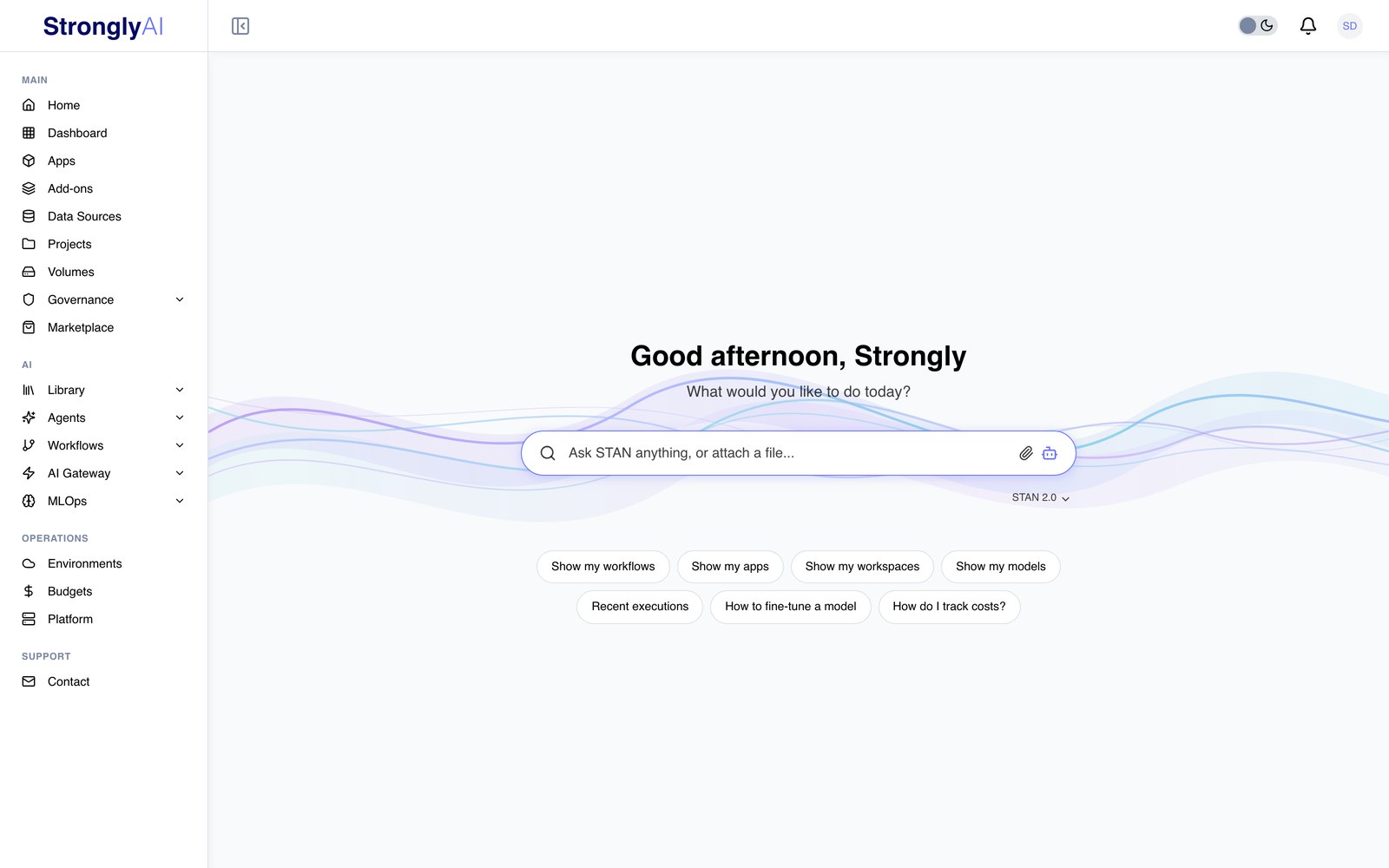
On every other page, STAN is in a side panel. Turn it on under Profile > Preferences > Enable STAN on every page: a STAN button appears in the bottom-right corner, and clicking it slides the panel out from the right edge (close it with the x or Escape). The panel is the same chat as the Home page, with every feature, and it is the same conversation: a chat started on Home carries on in the panel as you move around the platform, and the other way round.
The STAN Chat
The chat on the Home page and in the side panel offers:
| Feature | How |
|---|---|
| STAN version | The selector under the box: STAN 1.0 answers from the platform's help knowledge base; STAN 2.0 is the full assistant that builds, deploys and tests for you (it needs an AI model, chosen with /model). Switching starts a fresh conversation. |
| Attach files | The paperclip, or drag files onto the box. Text and code files, PDFs, Word and PowerPoint are read and sent with your message; images go to vision-capable models; CSV and Excel files are uploaded to training storage as datasets, and STAN gets a reference to them, never their rows. Attached files need STAN 2.0. |
| Answers as cards | Questions like "Show my workflows", "How many apps are running" or "What do I have" answer with cards you can click through to each item, with links and follow-up questions. They count what the matching pages count (the Workflows card lists your workflows and agents, never templates). |
| Live progress and Stop | While STAN 2.0 works you see its steps; the square button stops it at its next safe point. You can keep typing while it works to steer it. |
| Sessions | The layers button lists your live sessions; open one, or start a New one alongside the others. |
| History / Revert | The clock button lists the turns of the current session; revert to before one to undo the conversation from there (nothing STAN built is deleted). |
| Artifacts | The document button lists the documents STAN saved for you, to view, download or delete. |
| Start over | The circular arrow ends the session (and any workflow mode and code sessions it started) and begins a fresh one. |
| Secure credentials | When STAN needs a secret (an API key, a password), it asks for it in a secure input: the value goes straight to the component that needs it, never into the chat or to the model. |
With Proactive suggestions (monitor mode) on (Profile > Preferences), STAN shows a ! on its button when it notices something useful; open it to see the suggestion and act on it in one click, or dismiss it.
Example Interactions
Building a simple workflow:
"Create a workflow that checks my PostgreSQL database every hour and sends an email if any orders are past due."
Modifying an existing workflow:
"Add a retry mechanism to the API call node in case it fails."
Deploying a workflow:
"Deploy this workflow to production."
Testing a workflow:
"Test this workflow with sample data."
Checking execution results:
"What was the output of the PDF parser node in the last execution?"
Discovering services:
"What AI models do I have access to?" "List my PostgreSQL databases." "Show me my S3 connections."
Tips for Best Results
Be specific about what you want:
- Good: "Create a workflow that reads CSV files from my S3 bucket, filters rows where amount > 1000, and inserts them into my PostgreSQL analytics database."
- Less helpful: "Make me a data pipeline."
Let STAN discover your services: STAN automatically discovers your AI models, databases, and storage connections. You do not need to provide connection strings or IDs -- STAN finds them.
Review before deploying:
STAN will always ask for confirmation before deploying a workflow. Use get_workflow_summary to review the complete structure.
Use auto-layout:
After building complex workflows, STAN automatically calls auto_layout to arrange nodes in a clean left-to-right flow.
Technical Architecture
MCP Protocol
STAN communicates with the workflow builder through the Model Context Protocol (MCP), a standardized protocol for AI-tool interaction. Each tool has:
- Input schema -- JSON Schema defining required and optional parameters
- Output schema -- JSON Schema defining the expected response
- Annotations -- Behavioral hints (readOnly, destructive, idempotent, openWorld)
AI Gateway Integration
STAN uses the platform's AI Gateway to communicate with the underlying LLM. This means STAN can use any model configured in your AI Gateway:
- OpenAI (GPT-6, GPT-5)
- Anthropic (Claude)
- Google (Gemini)
- Self-hosted models via vLLM
- Any other provider configured in AI Gateway
Session Management
Each STAN conversation maintains a session that tracks:
- Conversation history
- Current workflow context (ID, state)
- Token usage
- Session creation and expiration
Context Management
STAN's system prompt is dynamically constructed to include:
- The full node catalog (the full node catalog with descriptions)
- Workflow templates for pattern matching
- Service configuration rules
- Active workflow details (in ACTIVE mode)
Privacy and Security
What STAN Can Access
- Your available AI models, add-ons, and data sources (IDs and names only)
- Your workflow structures and configurations
- Execution status and node outputs
- The workflow node catalog
What STAN Cannot Access
- Your application source code
- Passwords, API keys, or secrets
- Private data inside your databases
- Other users' information or resources
Data Handling
- Conversations are session-scoped and not stored permanently
- Tool calls are logged for debugging purposes
- STAN does not train on your private data
- All communication is encrypted
STAN is most powerful when building workflows. Describe what you want in natural language, and STAN will discover your services, build the workflow, and configure every node automatically. For complex workflows, start simple and iterate -- ask STAN to add features incrementally.