Managed Add-ons
An add-on is a database, cache, message queue or vector store that the platform runs for you. You pick the type, version and size; the platform deploys it, generates its credentials, and makes it reachable from your apps, workspaces and workflows. You never manage servers.
Supported Add-on Types
| Type | Versions (default first) | Port | Username | Database | Cluster mode | Best for |
|---|---|---|---|---|---|---|
 MongoDB MongoDB | 8.2, 8.0, 7.0 | 27017 | generated | admin | Yes | Documents with no fixed schema |
 PostgreSQL PostgreSQL | 18, 17.6, 16.10 | 5432 | generated | defaultdb | No | Relational tables, SQL, transactions |
 MySQL MySQL | 8.4, 8.0, 5.7 | 3306 | generated | defaultdb | No | Relational tables with wide compatibility |
 Greenplum Greenplum | 7.1.0, 6.27.1 | 5432 | generated | gpadmin | Yes | Large-scale analytics, in-database ML (MADlib) |
 Milvus Milvus | 2.6.3, 2.5.19, 2.4.11 | 19530 | generated | none | Yes (2.6+) | Vector similarity search (RAG, semantic search) |
 Redis Redis | 8, 7.4, 7.2 | 6379 | none (password only) | none | No | Caching, sessions, counters, pub/sub |
 Neo4j Neo4j | 5.26, 2025.08, 2025.07 | 7687 | neo4j | none | No | Graphs and connected data |
 RabbitMQ RabbitMQ | 4.1.4, 4.1.0, 4.0 | 5672 | generated | none | No | Queues between services |
 SurrealDB SurrealDB | 2.1, 2.0, 1.5 | 8000 | generated | none | No | Document, graph and relational data in one store |
| Apache Kafka | 4.3.1, 4.2.2, 4.1.2 | 9092 | generated | none | No | Durable, replayable event streams; feeding streaming workflows |
| MQTT (Mosquitto) | 2.1.2, 2.0.22, 2.0.21 | 1883 | generated | none | No | Device and sensor telemetry (publish/subscribe) |
"Generated" usernames look like user_a1b2c3d4. Every add-on gets a random 32-character password.
Create an Add-on
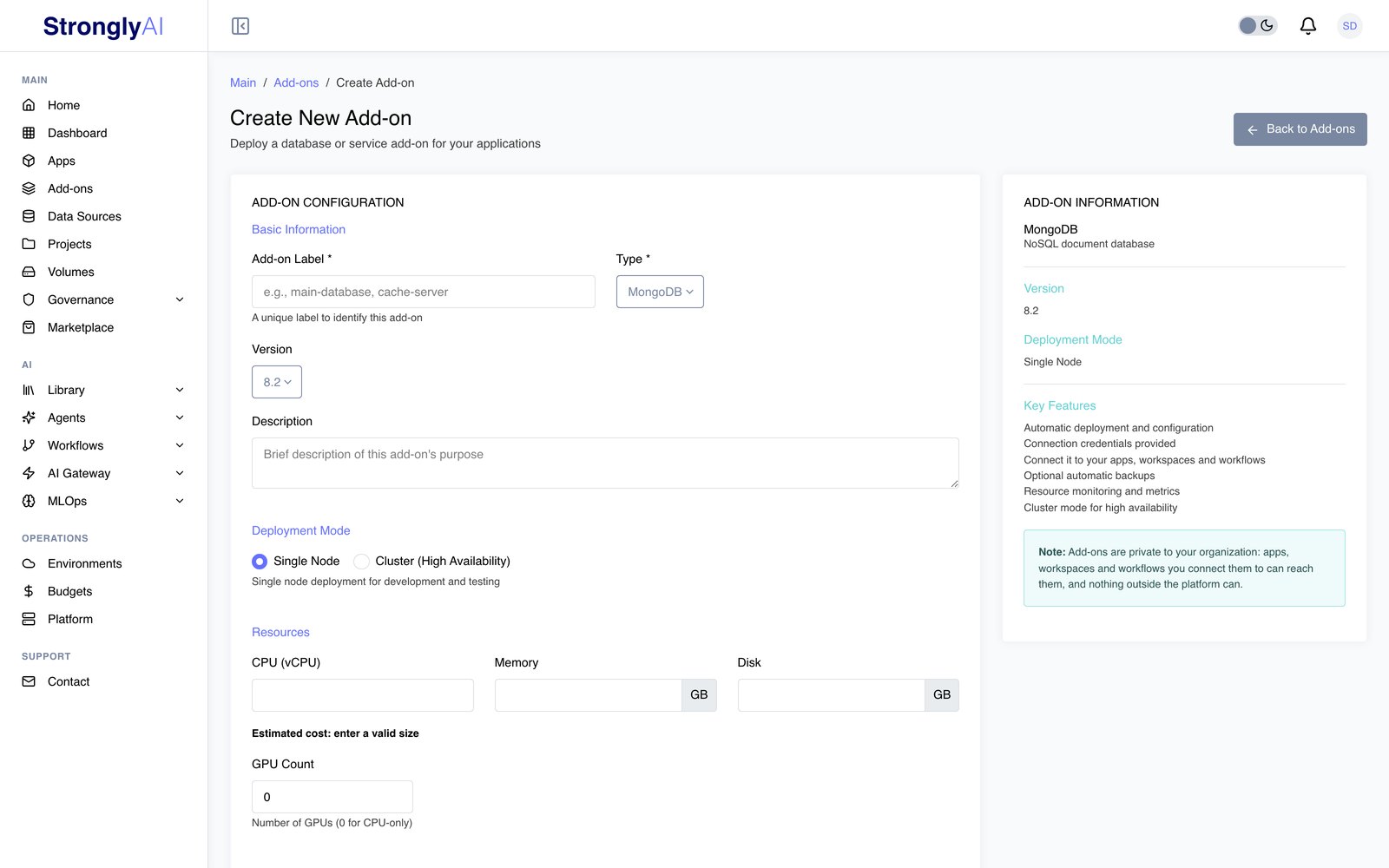
-
Go to Add-ons and click Create Add-on.
-
Under Basic Information, enter an Add-on Label (unique in your organization, for example
orders-db), pick the Type and Version, and optionally add a Description. -
For MongoDB, Milvus and Greenplum, choose a Deployment Mode (see Cluster mode).
-
Under Resources, set the size:
Setting Options Default CPU (vCPU) Any number of cores, e.g. 0.5, 1, 2 0.5 Memory Any amount in GB, at least the type's minimum 1 GB Disk Any amount in GB 10 GB GPU Count 0-8 (0 for CPU-only) 0 When GPU Count is above 0, choose the GPU type. A GPU add-on runs on the AI node pool, on a node with that GPU type, with its GPUs reserved for it (per node for a cluster; a cluster's helper services, such as Milvus's etcd and MinIO, stay on the add-on pool).
Enter any size. As you type, the form checks it (a positive amount, at least the type's minimum memory, and no more than the largest node your organization's add-on pool can provide, which it shows as "Up to ..."). What an add-on costs is shown in FinOps only. The platform containers that run beside the add-on (for example its metrics collector) are listed with their own small sizes; they are not taken out of the size you enter. Create Add-on stays disabled until the size is valid.
-
Optionally turn on Enable automatic backups and choose a Backup Schedule and Retention (backups to keep).
-
Click Create Add-on.
You land on the add-on's page while it deploys. The status badge shows DEPLOYING and changes to RUNNING when the add-on accepts connections, usually within a few minutes.
Budgets. Creating an add-on is checked against your organization's budgets. If a budget blocks it, you see the budget's reason and nothing is created. If a budget blocks the deployment right after creation, the add-on is left STOPPED with the reason shown on its page.
Sizes run exactly as set. The add-on gets the CPU and memory you enter, no more and no less. Each type has a minimum memory (256 MB for Redis and SurrealDB, 512 MB for PostgreSQL and RabbitMQ, 768 MB for MySQL, 1 GB for MongoDB, Neo4j, Milvus and Greenplum). You can resize later.
Cluster mode
MongoDB, Milvus and Greenplum can run as a multi-node cluster. Select Cluster (High Availability) under Deployment Mode and set:
- Data Nodes: 3-10
- Replication Factor: see below; its meaning and allowed values depend on the type
- Enable Arbiter Node (MongoDB): adds a tie-breaking member for elections
- Coordinator Nodes (Greenplum): 1
What the settings mean per type:
- MongoDB: a replica set with one member per data node and automatic failover; the arbiter votes in elections without holding data. Every member holds a full copy, so the replication factor must equal the number of data nodes.
- Milvus: a distributed Milvus with query nodes for search (one per data node) and the replication factor as the number of in-memory copies of each loaded collection, at most the number of data nodes. Requires version 2.6 or later.
- Greenplum: a coordinator (master) and segment hosts (one per data node) that run each query in parallel. Replication factor 1 keeps one copy of each segment; 2 adds a mirror of every segment on another host.
A value a type cannot provide (for example a Greenplum replication factor of 3) is refused when you create the add-on, with the reason.
You connect to a cluster the same way as to a single node; the platform routes connections for you. A cluster uses the chosen CPU, memory and disk per node, so it costs several times a single node. All other types run as a single node.
Add-on Statuses
| Status | Meaning |
|---|---|
| DEPLOYING | Being created, or started and not yet accepting connections |
| STARTING | A start or restart is in progress |
| RUNNING | Accepting connections |
| STOPPING | A stop is in progress |
| STOPPED | Not running; data is kept |
| ERROR | Something failed; the reason is shown under the status. Use Recover |
| PENDING_DELETE | Being deleted |
The platform keeps each add-on's status current from what the add-on is actually doing; you do not need the page open for it to update.
Connect to an Add-on
An add-on's address is private to the platform: apps, workspaces and workflows in your organization can reach it; your laptop and the internet cannot.
From an app
When you deploy an app, click Add-ons and pick the add-ons it needs in Select Add-ons (running and deploying add-ons you can use are listed). The app receives each one's connection details in the STRONGLY_SERVICES environment variable:
import os
import json
from pymongo import MongoClient

services = json.loads(os.environ['STRONGLY_SERVICES'])

# Add-ons are grouped by type; pick yours by name (the label you gave it)
mongo = next(
    a for a in services['services']['addons']['mongodb']
    if a['name'] == 'orders-db'
)

client = MongoClient(mongo['connection']['connection_string'])
db = client[mongo['connection']['database']]
Each add-on entry has this shape:
{
  "id": "addon-abc123defg",
  "name": "orders-db",
  "type": "mongodb",
  "category": "add-on",
  "status": "running",
  "version": "8.2",
  "internal": false,
  "connection": {
    "connection_string": "mongodb://user_ab12cd34:<password>@<internal-host>:27017/admin",
    "uri": "mongodb://user_ab12cd34:<password>@<internal-host>:27017/admin",
    "host": "<internal-host>",
    "port": 27017,
    "database": "admin"
  },
  "auth": {
    "method": "username_password",
    "credentials": { "username": "user_ab12cd34", "password": "<password>" }
  },
  "limits": { "max_connections": 100, "storage_gb": 10 },
  "metadata": { "cpu": "0.5", "memory": "1GB", "disk": "10GB", "backup_enabled": false }
}
Each type's page has connection examples in Python, Node.js and more.
From a workspace
When you create a workspace, open the Services tab and select the add-ons under Add-ons. They are available in the workspace through the same STRONGLY_SERVICES variable, so code you write in a notebook works unchanged in an app.
From a workflow
Every workflow node for a type the platform offers as an add-on (the PostgreSQL, MySQL, MongoDB, Redis, Neo4j, Milvus, RabbitMQ, Greenplum, SurrealDB, Kafka and MQTT source and destination nodes, batch and streaming, and the memory nodes) has a Connection Type setting. Choose Use Add-on (Managed by Strongly) and pick your add-on in the field that appears (for example Select PostgreSQL Add-on), or Use Data Source (External) and pick a data source for a server you run elsewhere. Either way the node connects with the credentials the platform passes it; you never paste a password into a node.
Connection details
Once the add-on is running, the Connection tab shows the Internal Host (for apps), Port, Database, Username, Password and a ready-to-use Connection String, each with a copy button. The password and connection string are hidden until you reveal them. Credentials are stored encrypted and are shown to the owner and to anyone the add-on is shared with.
You can also read them with the REST API or Python SDK.
Manage an Add-on
The add-on's page has a status card and the tabs Overview, Connection, Metrics, Backup, Logs, Schedule and Permissions.
Start, stop and recover
The status card shows the action that applies:
- Stop (when running): stops the add-on to save cost. Its data is kept; connections fail until you start it again.
- Start (when stopped): starts it again. Starting is checked against your budgets; if a budget refuses, the add-on stays stopped and the budget's reason is shown.
- Recover (when in error): redeploys the add-on on its existing data with the same credentials.
After a platform update that changes an add-on's probes or server settings, a running add-on keeps running and its page asks for a restart (the add-on is unavailable for a moment; its data is kept). A stopped add-on takes the change when it starts. See Platform Updates.
The API and SDK also offer restart.
Scheduled start and stop
Run an add-on only when it is needed, for example during working hours. On the Schedule tab:
- Turn on Enable scheduled start/stop.
- Pick a Timezone, Start Time and Stop Time.
- Select the Days of Week it should run.
- Optionally choose a Holiday Calendar (US Federal Holidays or UK Bank Holidays) to keep it stopped on those days.
The add-on is started and stopped automatically; its data is kept while stopped. Changes save as you make them. The last automatic start and stop times are shown at the bottom.
Metrics
The Metrics tab measures the running add-on each time it loads (it takes a few seconds) and shows:
- CPU, memory and disk use against the add-on's size
- Network traffic in and out
- Connections: open client connections now, and new connections per minute (this count includes the platform's own health checks)
- Response time: how long the add-on takes to answer a simple authenticated request from the platform, averaged over five tries
- Health: whether every instance is ready, restart counts, and uptime (how long at least one instance has served without interruption)
Metrics are available only while the add-on is running.
Logs
The Logs tab shows the add-on's log output since it started, useful for startup failures and error messages. It opens on the newest 100 lines; scroll to the top of the log to load the 100 before them, as far back as the log goes ("Start of the log" marks its first line). Each line shows the level the add-on wrote (for example INFO, WARNING, ERROR); a line that states none shows none. Once a stopped add-on has shut down, there are no logs to show.
Backups
Back up now. Click Backup Now on the status card, or Back Up Now on the Backup tab, while the add-on is running. The backup runs in the background; the add-on keeps serving. Only one backup of an add-on runs at a time.
Automatic backups. On the Backup tab turn on Enable Automatic Backups, choose a Backup Schedule (Hourly, Daily, Weekly or Monthly) and a Retention (3, 7, 14 or 30 backups), and click Save Configuration. You can also enable them when creating the add-on. The first automatic backup runs one interval after you enable the schedule (or change it), then every interval after that. A scheduled backup that cannot run, for example because the add-on is stopped at that moment, is recorded as skipped with the reason.
Retention. The newest successful backups, up to the retention count, are kept; older ones are deleted automatically. Retention applies to manual backups too, and can be set with automatic backups off.
Backup status and history. The Backup tab shows the Last Successful Backup, the Next Scheduled run, the space Stored, the reason for the latest failure or skip, and a Backup History table with each backup's start time, trigger (manual or scheduled), status, size, completion time and details.
Each backup is taken with the database's own export tool and stored in the platform's backup storage:
| Type | What a backup contains |
|---|---|
| PostgreSQL | pg_dumpall of every database, including roles (backup.sql) |
| MySQL | mysqldump of all databases with routines, events and triggers (backup.sql) |
| Greenplum | pg_dumpall of the database cluster (backup.sql) |
| MongoDB | mongodump archive of every database (backup.archive); a cluster is dumped from the replica set |
| Redis | RDB snapshot (backup.rdb) |
| SurrealDB | An export of each namespace and database (.surql files) |
| RabbitMQ | Broker definitions: queues, exchanges, bindings, users, virtual hosts and policies (definitions.json). Messages in queues are not included |
| Neo4j | Cypher export of the whole graph (backup.cypher) and the indexes and constraints under their own names (schema.cypher) |
| Milvus | Every collection with its data and index settings, taken with the official Milvus backup tool, plus a record of which collections were loaded |
| Kafka | Every topic with its partitions and configs, every record exactly as written (keys, values, headers and timestamps) up to where each partition ended when the backup started, and each consumer group's position |
| MQTT | The retained messages (each topic's last value, with its QoS). Persistent sessions and messages queued for offline clients are not included |
Backups are optional and off by default: an add-on is only backed up when you click Back Up Now or turn on automatic backups.
Restoring a backup
A restore loads one of the add-on's backups back into the same add-on. Everything the add-on holds is replaced by what the backup holds: data written after the backup was taken is lost, and anything created since (databases, tables, collections, keys, queues) is removed.
- Open the add-on and go to the Backup tab.
- In Backup History, click Restore next to the backup you want. Only backups with the status Succeeded can be restored.
- Read the confirmation, which says what connected apps see while the restore runs, and click Yes, restore.
The add-on keeps running during the restore. Restore History lists every restore with its start time, the backup it restored, its status (Starting, Restoring, Succeeded or Failed), completion time and, for a failed restore, the step that failed and its error output. While a restore runs, a banner on the Backup tab shows it, and Back Up Now and Restore are unavailable: one backup or restore of an add-on runs at a time, and a scheduled backup that falls due during a restore is recorded as skipped. Only a running add-on can be restored. A backup that a restore is reading is kept until the restore ends, even if retention would otherwise delete it.
What a restore does, by type:
| Type | What the restore replaces | What a connected app sees meanwhile |
|---|---|---|
| PostgreSQL | Every database and role is dropped and recreated from the backup | Open connections are closed; queries fail until the restore finishes |
| Greenplum | Every database and role is dropped and recreated from the backup | Open connections are closed; queries fail until the restore finishes |
| MySQL | Every database is dropped and recreated from the backup, then the user accounts in the backup are reloaded | Queries against the databases fail until the restore finishes |
| MongoDB | Every database is dropped and reloaded from the backup | Reads find missing data until the restore finishes |
| Redis | Every key is removed, then the keys in the backup are loaded with their expiry times, in every logical database | Reads miss keys until the restore finishes |
| RabbitMQ | Virtual hosts, queues, exchanges, bindings, policies and users the backup does not define (or defines differently) are deleted, then the backup's definitions are imported | Messages in deleted queues are lost; queues the backup also defines keep their messages; connections to deleted virtual hosts or users are closed |
| Neo4j | Every node, relationship, index and constraint is deleted, then the graph, indexes and constraints in the backup are loaded | Queries find missing data until the restore finishes |
| SurrealDB | Every database (and every namespace the backup does not have) is removed and reloaded from the backup | Queries find missing data until the restore finishes |
| Milvus | Every collection is dropped, the backup's collections are restored with their indexes, and the ones that were loaded when the backup was taken are loaded again | Searches fail until the collections are loaded again |
| Kafka | Every topic and consumer group is deleted, the backup's topics are recreated with their records, and each consumer group resumes from the same position. Stop the consumers first: a restore refuses while a consumer group has members | Producers and consumers fail until the restore finishes |
| MQTT | The retained messages are replaced by the backup's (retained messages the backup does not have are cleared) | Connected clients stay connected and receive the restored retained messages on their next subscribe |
The add-on's own credentials do not change. If a restore fails, the add-on may hold part of the backup: fix the cause shown in Restore History and restore again.
Permissions
The Permissions tab controls who else can use the add-on:
- Authorized Users: click Add User to pick people from your organization. They can see the add-on and its credentials, connect it to their apps, workspaces and workflows, and start, stop and manage it.
- Access Control: Allow all users lets everyone in your organization see and use the add-on (connect to it and read its credentials) without being able to change or delete it. Make Private limits it to you and the authorized users.
- Owner: the owner always has full access.
Resize
On the Overview tab, click Resize under Resource Allocation, enter the new CPU, Memory and Disk (per node for a cluster), and click Apply. The fields are checked as you type, the same as on the create form.
- Changing CPU or memory restarts the add-on onto the new size. It is unavailable for a short time while it restarts; its data is kept.
- Disk grows while the add-on keeps running. Disk can only grow, never shrink.
- A resize is checked against your budgets, like starting the add-on.
- Resize is available while the add-on is running or stopped. A stopped add-on starts at its new size.
Delete
Click Delete on the status card and confirm. The add-on and all of its data are removed, including its backups; this cannot be undone. The status shows PENDING_DELETE until the add-on is gone. Once a delete has started, it finishes even if you close the page or lose your connection.
Deletion is refused while something still uses the add-on: a connected app, a feature store, an agent or a workflow node. The message names what to disconnect first.
Use the API and SDK
Everything above is available programmatically: